
Every Kartra review seems to describe a different product, and it’s not hard to see why.
Most were written before the platform got a serious makeover, and none of them tell you the real reason to buy: one login, one bill, and a whole lot less tech to wire together.
So here’s what you’re actually buying now: an all-in-one platform for selling your own courses, memberships and digital products, from $59 a month, though the Starter plan at $119 is where the value really lands.
And if you’re hunting for Kartra’s built-in webinars, you won’t find them.

Kartra helps you run your online business from one place, cutting the cost and chaos of a mixed tool stack.
- All-in-one convenience: One login and one bill replace a stack of separate tools, so you spend less time wiring things together.
- Behaviour-based automations: Automations (Growth+) let you personalise follow-up and let lead scoring spot your hottest prospects.
- Unlimited email and video hosting: The Starter plan removes caps, so you can send broadcasts and host course videos without extra fees.
- Built-in checkout upsells: One-click upsells and order bumps help you earn more from each customer without a separate tool.
- Templates and funnel mapping: Pre-built templates get you live fast, and the visual funnel mapper keeps your sales path clear.
- Steep learning curve: The interface can feel clunky, and new users often need time to find their way around.
- No sub-accounts for agencies: Kartra lacks white-label and sub-account features, making it a poor fit for managing client work.
- Page builder can lag: Some users report a slow page editor, and bugs can appear after updates.
- Webinars removed: Kartra is retiring webinars, so anyone relying on live events now needs a separate tool.
- Price jump after Essentials: The transaction fee on Essentials grows with your sales, and moving to Starter requires a near-doubling of monthly cost.
Key Takeaways
- One subscription replaces your page builder, email tool and course platform, cutting monthly costs and setup time.
- Essentials carries a 5% transaction fee that grows with every sale you make, which can nudge you toward Starter.
- Starter at $119 drops transaction fees and unlocks unlimited products, email and video hosting.
- Kartra AI generates sales copy inside the builder, but it doesn’t build pages or funnels for you.
Webinars retired on 1 November 2026, so you’ll need a separate tool like WebinarJam.
- Kartra fits creators selling their own stuff, not agencies managing client accounts.
Kartra Review: The Short Verdict
Kartra is all about giving you back your time and simplifying your tech life. One login, one bill, and your pages, checkout, email and customer data finally talk to each other, so you launch faster and spend your days selling, not fixing broken integrations.
It’s a strong fit if you sell your own courses, coaching or digital products and want fewer tools to juggle.
It starts to feel like the wrong tool when you’re an agency. Kartra just doesn’t have sub-accounts or white-label in the way GoHighLevel does, and managing client work inside Kartra gets messy fast.
The learning curve is real too. New users find the interface clunky in places, and the page editor can lag. Plus, Kartra retired webinars, so anyone who relied on that feature is going to need an alternative like WebinarJam.
I recommend the Starter plan at $119 a month. It drops the transaction fees, gives you unlimited everything and throws in video hosting, calendars and five team seats. You get the full Kartra feel without the scary upsells.
What Is Kartra?
Everything your online business needs to sell in one place, so your pages, checkout, emails and customer data finally talk to each other. No plugins, no separate hosting, and no Zapier spaghetti unless you want it.
Think of Kartra as the tool that replaces ClickFunnels, ActiveCampaign, Kajabi, Calendly and Teachable, all at once. You build a funnel, sell a course, send an email broadcast and book a coaching call from the same dashboard.
According to Kartra, over 60,000 customers have used the platform, selling 3.4 million courses and earning a combined $1.5 billion. Those are big numbers for a product that many people still think of as “that clunky thing from a few years ago.” The relaunch changed the story.
Kartra Features: What You Actually Get
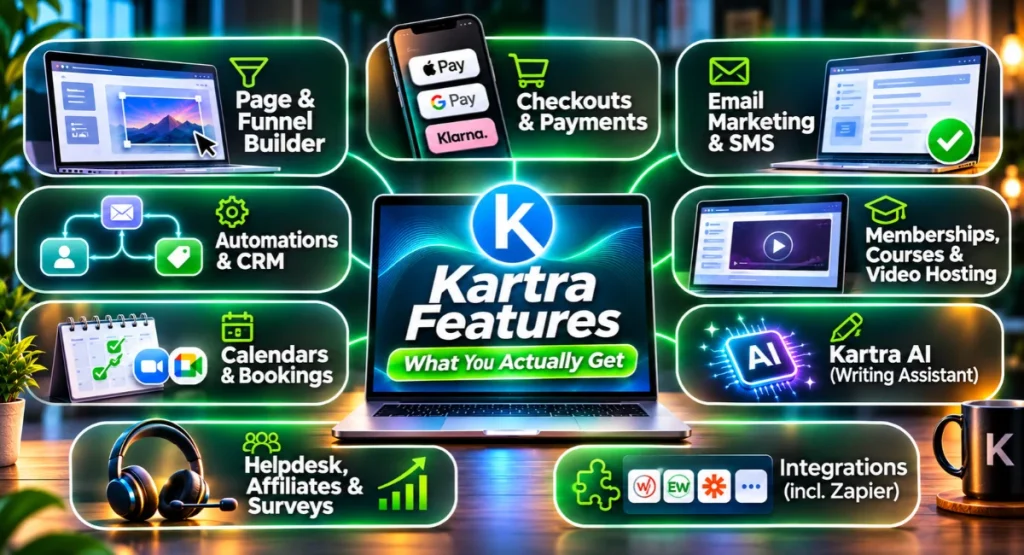
Every feature in Kartra is built to help you sell your own stuff without a sprawling tech stack. Let’s walk through what that actually means for your business.
Page And Funnel Builder
Launch sales pages and complete funnels without hiring a designer. The drag-and-drop builder and refreshed templates let you build pages effortlessly, and split testing shows you which version sells more.
The funnel mapper lays out your entire customer journey visually, which makes building a multi-step offer feel less like guesswork. On Growth and above, the funnel simulator walks through your funnel as a customer would, so you catch issues before a real lead ever sees them.
A question that comes up a lot: whether Kartra can replace your web hosting. I’ve covered that in detail in a separate article. You host your pages, checkout and membership portal on Kartra’s servers, and many product businesses can run without separate hosting, though a blog or content site may still suit WordPress.
Checkouts And Payments
Earn more from each customer, not just from the first sale. One-click upsells and order bumps are built right in, and the new one-step checkout helps buyers complete the purchase faster.
You can sell a subscription or set up payment plans without touching a separate tool, which makes higher prices easier to say yes to. The embedded checkout is clever, too: place a one-step Kartra checkout on an external website, so your blog stays on WordPress while the checkout runs on Kartra.
Kartra Email Marketing And SMS
Kartra email marketing keeps your leads warm, automatically. Broadcasts and sequences are built in, and you get unlimited email on Starter and above, so you pay no extra to grow your list.
You can stick with Kartra’s own sending or connect an external sender like SendGrid, Mailgun or Postmark if you prefer. SMS runs through Twilio, Plivo or Vonage, and the new AI spam checker helps your emails stay out of the spam folder. It’s not a guarantee, obviously, but it’s a nice safety net that catches problems before you send.
Automations And CRM
Personalised follow-up runs while you sleep. Behaviour-based automations, available from Growth and up, let you trigger emails, tags and list moves based on what a contact actually does.
Someone visits a sales page but doesn’t buy?
They can automatically get a follow-up sequence two hours later.
Lead scoring shows you who’s ready to buy, so you spend your time on the hottest leads instead of guessing.
The CRM side is built in, which means Kartra tracks every contact’s history, tags, custom fields and lead scores. So, is Kartra a CRM?
For your own customers and leads, yes.
It remembers who bought what, who opened which email, and who’s worth a manual follow-up, so you never have to dig through spreadsheets. It’s not a full sales pipeline for a big outbound team, but for a solo creator it covers the important stuff.
Memberships, Courses And Video Hosting
Deliver your course inside a branded portal and stop paying for a separate video host. You get a drag-and-drop membership builder, and the Essentials plan includes one membership or course, while Starter and above give you unlimited memberships.
Unlimited video hosting on Starter and above saves you one more monthly bill. You upload your videos into Kartra’s custom player, no separate Vimeo or YouTube embeds required, and your course lives right alongside your pages and checkout.
Calendars And Bookings
Clients book and pay without the back-and-forth emails. Set your availability, let clients reschedule, and take paid bookings directly, all from the same calendar that syncs with Zoom and Google Meet.
For coaches who sell sessions as part of a course or membership, this tidies things up beautifully.
Kartra AI
Kartra AI helps you beat the blank page and write sales copy faster, not design pages. You set the tone and language inside the page builder, email composer or SMS composer, and it spits out a draft.
Every click counts as a “use”, including regenerations. The allowance is 30 uses on Essentials, 100 on Starter and 250 on Growth.
It runs on OpenAI, so the output is generally solid, but know this: Kartra AI will not build a page, design a funnel or create a course for you.
It’s a writing assistant, not a magic wand, and those monthly limits go faster than you’d think if you’re a heavy regenerator.
Helpdesk, Affiliates And Surveys
Let other people sell your products on commission with the built-in affiliate management, available from Growth upward. Recruit affiliates who promote your stuff, and you only pay when they make a sale.
Surveys and quizzes, also from Growth, capture leads and tell you what your audience wants. And the helpdesk ticketing system keeps customer questions organised, with live chat added on Professional.
Kartra Integrations
Keep the tools you already rely on while Kartra handles the heavy lifting. Direct connections to WebinarJam and EverWebinar, membership plugins like WishList, OptimizePress, aMember, DAP, s2Member and Kajabi, and external email senders mean you don’t lose what’s already working.
Zapier needs the Growth plan or higher, which is worth knowing if your workflow depends on it and you’re eyeing a lower tier.
What’s New In Kartra
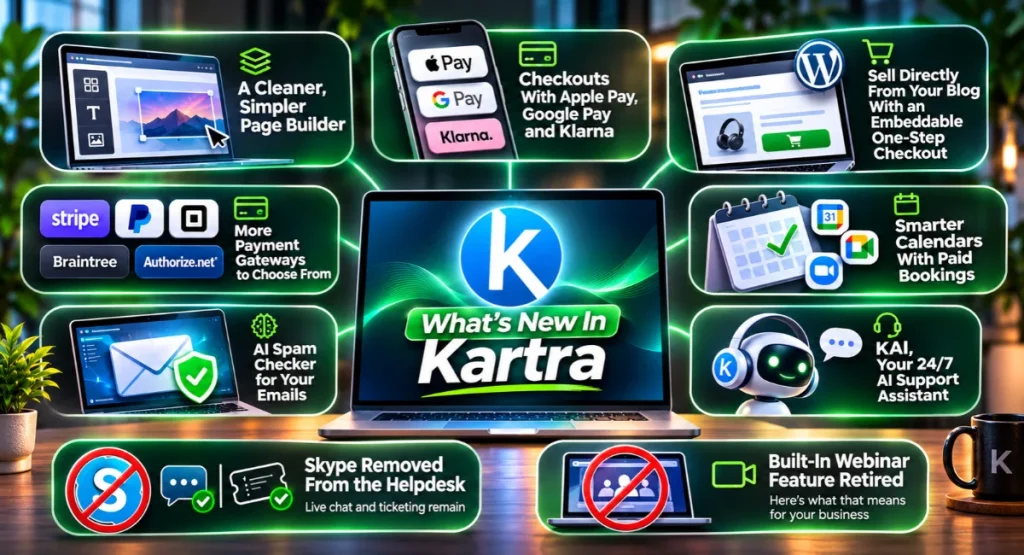
You get a smoother selling experience with Kartra’s latest updates. The page builder looks cleaner, checkouts are built to convert, and there’s a handful of smart tools to save you time.
A Cleaner, Simpler Page Builder
The visual refresh makes the builder cleaner and less cluttered, so you can work more comfortably and focus on your content.
Checkouts That Accept Apple Pay, Google Pay and Klarna
Give buyers the payment methods they want. Apple Pay, Google Pay and Klarna are supported through Stripe, inside a one-step checkout.
Sell Directly From Your Blog With an Embeddable One-Step Checkout
Keep your WordPress site and still sell. The one-step checkout embeds on any page, so your blog becomes a sales machine without extra cart plugins.
More Payment Gateways to Choose From
You can now choose from Stripe, PayPal, Square, Braintree and Authorize.net. Pick the gateway that fits your business and location.
Smarter Calendars With Paid Bookings
Let clients pay when they book, and sync with Google Calendar, Google Meet and Zoom. No more scheduling ping-pong.
Clients can reschedule on their own, cutting your admin work.
AI Spam Checker for Your Emails
The built-in AI spam checker scans your email copy for spammy language before you send, helping you improve inbox placement.
KAI, Your 24/7 AI Support Assistant
KAI is a 24/7 AI support assistant. If it can’t solve your issue, you’ll be handed off to a real person.
Skype Removed From the Helpdesk
Skype is no longer an option in the helpdesk. Live chat and ticketing remain, so you can keep supporting customers without interruption.
One more change: Kartra’s built-in webinar feature has been retired. Here’s what that means for your business.
What Happened To Kartra Webinars?
Kartra retired its built-in webinar feature, which means you’ll need to move to a dedicated webinar tool if live events are part of your sales process. The deadline was 1 November 2026. After that, you can’t create new webinars or edit existing ones inside Kartra.
Download your recordings now and export your registrant lists. The natural replacement is WebinarJam, which integrates well with Kartra. With this link you get 3 months of WebinarJam for $99, which makes the switch a little less painful.
Kartra Pricing And Plans
Kartra pricing starts at $59 a month, but the real value is what it replaces: a funnel builder, email platform, course host, video host and calendar tool, all in one subscription. Here’s how the four tiers land.
| Plan | Monthly | Annual per month | Contacts | Transaction fee | Key unlock |
|---|---|---|---|---|---|
| Essentials | $59 | $52 | 500 | 5% | 1 product, 5 pages, 1 membership |
| Starter | $119 | $99 | 2,500 | 0% | Unlimited products, email, video, 5 team |
| Growth | $229 | $189 | 12,500 | 0% | Automations, affiliate, funnel simulator |
| Professional | $549 | $429 | 25,000 | Not listed | Live chat, 5 custom domains, real-time analytics |
Annual billing saves up to 22%, and if you go over your contact limit, Kartra moves you up to the next plan automatically.
That 5% transaction fee on Essentials is where the value maths shifts. Sell a $500 course and Kartra invoices you an extra $25 on top of your normal payment processor fees. As your sales grow, that fee grows right along with them, and suddenly the gap to Starter doesn’t look so wide.
The Starter plan drops that fee to zero and gives you unlimited products, email and video hosting. I’d only pause on Essentials if you’re truly just testing the water.
For the detail behind each tier, I’ve got a full Kartra plan comparison.
Answer six quick questions and I'll point you to the simplest Kartra plan for what you're building.
No email needed, result straight away.
Choose the top end of the range you expect.
Count everything you'll sell from, not just courses.
Both video hosting and calendars need Starter.
These are Growth features, so tick yes if you'll use any of them.
Live chat and real-time funnel analytics are Professional features.
Kartra is retiring webinars, so we'll point you to WebinarJam if you say yes.
Kartra Essentials costs $59 a month, or $52 a month billed annually. There's a 5% transaction fee on sales, and the SteveW30 discount does not apply to this plan.
Kartra Starter costs $119 a month, or $99 a month billed annually, and includes 2,500 contacts, unlimited products and pages, video hosting, calendars and 0% transaction fees. Use code SteveW30 with this link for 30% off your first payment.
Kartra Growth costs $229 a month, or $189 a month billed annually, and includes 12,500 contacts, automations, affiliate management, helpdesk ticketing, and Zapier and API access. Use code SteveW30 with this link for 30% off your first payment.
Kartra Professional costs $549 a month, or $429 a month billed annually. It includes 25,000 contacts, helpdesk live chat and real-time funnel analytics.
Nothing in your answers needed more than Essentials, so this is the cheapest plan for you.
Kartra retired its webinar builder in November 2026, so you can't create new webinars, though past ones and recordings remain. Pair your plan with WebinarJam: with this link you get 3 months of WebinarJam Basic for $99. Get WebinarJam for $99
Kartra Free Trial And Discount
A 30-day trial gives you enough time to build a few pages, test the checkout and see if Kartra’s workflow clicks, without any upfront commitment. The standard Kartra trial is 14 days, but with this link you can start your 30-day Kartra trial, which doubles the runway.
New customers on the Starter or Growth plan can use code SteveW30 at checkout for 30% off their first payment. A card is required, but cancel before day 30 and you won’t be charged a thing.
During the trial you’re capped at 1,000 emails and automations are locked. That’s enough to get a real feel for the builder, but not enough to run a live funnel. The 30-day money-back guarantee applies to the first payment only, so once you become a paying customer the clock starts ticking on that protection.
I’ve written out the step-by-step how to get the 30-day Kartra trial, if you want the full walkthrough.
Kartra Pros And Cons
- All-in-one convenience: One login and one bill replace a stack of separate tools, so you spend less time wiring things together
- Behaviour-based automations: Automations (Growth+) let you personalise follow-up and let lead scoring spot your hottest prospects
- Unlimited email and video hosting: The Starter plan removes caps, so you can send broadcasts and host course videos without extra fees
- Built-in checkout upsells: One-click upsells and order bumps help you earn more from each customer without a separate tool
- Templates and funnel mapping: Pre-built templates get you live fast, and the visual funnel mapper keeps your sales path clear
- Steep learning curve: The interface can feel clunky, and new users often need time to find their way around
- No sub-accounts for agencies: Kartra lacks white-label and sub-account features, making it a poor fit for managing client work
- Page builder can lag: Some users report a slow page editor, and bugs can appear after updates
- Webinars removed: Kartra is retiring webinars, so anyone relying on live events now needs a separate tool
- Price jump after Essentials: The transaction fee on Essentials grows with your sales, and moving to Starter requires a near-doubling of monthly cost
In practice, the pros list is strong if you’re a creator who builds a single digital ecosystem around one brand. The cons start to bite when your needs go beyond that.
Kartra scores 4.5 out of 5 from 168 Capterra reviews, with ease of use at 4.0 and support at 4.1.
That tells you people like what it does, but they also agree it takes work to learn.
What Real Users Say
Users across Capterra, G2 and Trustpilot consistently say Kartra saves them from juggling multiple tools, but the learning curve can be frustrating. Across Capterra (4.5 stars), G2 (3.9 stars) and Trustpilot (3.2 stars), a few themes keep popping up in Kartra reviews.
People love replacing a pile of separate tools with one login. The templated funnel flows and behaviour-based automations get a lot of praise. The gripes tend to cluster around the same things: a page builder that can feel slow and dated in places, bugs that surface after updates, and support response times that aren’t always quick.
Smaller businesses also mention that the price stings until they hit a revenue level that makes it feel worth it. You can browse the scores yourself on G2.
Who Is Kartra Best For?
If you match Kartra’s sweet spot, you get a business that runs from one dashboard and finally stops bleeding subscription fees. Good fit: you’re a coach, course creator or small business owner selling your own digital products. You want to build funnels, host a membership and send emails without a tech stack that requires a whiteboard to explain.
Not a great fit: you’re an agency managing client accounts. Kartra doesn’t do sub-accounts or white-label the way agencies need, and you’ll quickly feel cramped. If that sounds like you, have a read of my GoHighLevel pros and cons.
Large teams with complex sales pipelines will likely outgrow the CRM and need something more dedicated. Also, if webinars are a pillar of your business, Kartra now forces you into a two-tool setup, which defeats some of the all-in-one appeal.
Kartra Alternatives
GoHighLevel
GoHighLevel is built for agencies and local businesses that need sub-accounts, white-label and a full CRM. It’s the go-to for people who sell services to clients, and the agency tooling is in a different league, even if the learning curve is arguably steeper than Kartra’s.
With this link you get a 30-day GoHighLevel trial plus a free setup bootcamp. I broke down the differences in Kartra or GoHighLevel if you’re torn between the two.
ClickFunnels
ClickFunnels focuses purely on funnels and selling your own products, with a simpler toolset starting at $97 a month. It’s ideal if you want a funnel-first experience without all the extras, and many people find its funnel building flow more intuitive.
You can grab a ClickFunnels 14-day trial to see how it feels. I mapped out exactly how Kartra compares to ClickFunnels if you want the side-by-side.
Systeme.io
Systeme.io is the budget pick, offering a free-forever plan that covers funnels, email and courses. It’s a popular starting point if you’re not ready to commit to $119 a month, though the trade-off is fewer templates and less power under the hood.
My review of Systeme.io’s free plan walks through what you actually get at zero cost.
Kajabi
Kajabi leans more toward the course-creation experience, with a polished course-first platform that suits people who mainly sell courses rather than complex funnels.
Is Kartra Worth It?
Is Kartra worth it? For a creator selling digital products, the maths often says yes, because a single subscription covers what would otherwise be five separate bills.
A good funnel builder, email platform, course host, video host and calendar tool add up fast when bought separately.
On Starter, Kartra brings them together for $119 a month.
The trade is the learning curve, which is real, and the fact that the platform is optimised for one business, not many. If that matches your world, the money works. Stick to the Starter plan until you genuinely need automations, then step up.
Frequently Asked Questions
Is Kartra legit?
Yes, Kartra is a legit all-in-one marketing platform with over 60,000 customers, according to Kartra, and creators have earned $1.5 billion through the platform. It’s been through a recent relaunch and continues to be actively developed.
How much is Kartra per month?
Kartra plans cost $59, $119, $229 and $549 when billed monthly. Annual billing drops the price to $52, $99, $189 and $429 per month. The Essentials plan includes a 5% transaction fee, while higher plans have zero transaction fees.
How does Kartra work?
Kartra gives you a single dashboard to build pages, create funnels, sell products, send emails and host courses. Everything connects inside the ecosystem, so you don’t need to integrate separate tools unless you want to.
Is Kartra free to use?
No, Kartra doesn’t have a free forever plan. It offers a 30-day trial with this link and a standard 14-day trial on the pricing page, after which a paid plan is required.
Is Kartra a CRM?
Yes, Kartra acts as a built-in CRM for your own customers and leads. It tracks contact history, tags, custom fields and lead scoring, but it’s not a full sales pipeline CRM for outbound sales teams.
What is Kartra used for?
Kartra is used for building sales funnels, selling digital products, hosting membership sites and courses, sending email marketing campaigns and managing customer support from one platform.
Kartra Review: My Final Verdict
Kartra helps you run your online business from one place, cutting the cost and chaos of a mixed tool stack. If you’re a creator or coach selling your own stuff and you want one platform to hold the whole thing, go Starter at $119 a month. The zero transaction fees and unlimited video alone make the plan worth it.
Grab the 30-day trial through this link and use code SteveW30 for 30% off your first payment. Give the builder a proper run, build a checkout, send a few emails. You’ll know within a couple of weeks if it’s your thing.
If it clicks, you’ve just replaced five subscriptions with one.

Steve West is the founder of entrepreneurnut.com, and has been working online since 2013. He specializes in SEO, YouTube, and affiliate marketing. Besides running his online business, he likes hiking, keeping fit, and eating cookies (which is why he needs to keep fit!)