
This blog is reader supported. If you click one of our links and make a purchase, we may receive a commission at no extra cost to you. In that event we thank you so much, for supporting our blog, it means the world to us. Have a great day!
Last Updated on 26th June 2026
Some days, email can feel less like a communication tool and more like a second full-time job.
You sit down to answer a few messages, and before you know it you’re knee-deep in newsletters, notifications, receipts, promotions, and emails that seemed important three days ago but now feel about as urgent as last week’s weather forecast.
That’s where AI email management tools come in.
The right tool can help you organize your inbox, prioritize important conversations, reduce distractions, and spend less time playing email traffic controller.
In this guide, you’ll discover the best AI tools for email management for entrepreneurs, including options for inbox organization, productivity, focus, and email cleanup.
AI Email Management Tools: Key Takeaways
- SaneBox is the best overall choice for entrepreneurs who want a cleaner inbox and better email prioritization.
- Superhuman is ideal for people who spend a large part of their day managing email.
- Shortwave combines Gmail with powerful AI features and automation.
- Mailman helps reduce interruptions and protect valuable focus time.
- Clean Email is one of the best tools for decluttering an overloaded inbox.
| Image | Product | Features | Price |
|---|---|---|---|
Best Overall ![]() |
| Check Price | |
Email Power Users ![]() |

| Check Price | |
Good for Gmail Users ![]() |

| Check Price | |
Focus Time ![]() |
| Check Price | |
Inbox Cleanup ![]() |
| Check Price |
1. SaneBox: Best AI Email Management Tool for Inbox Organization
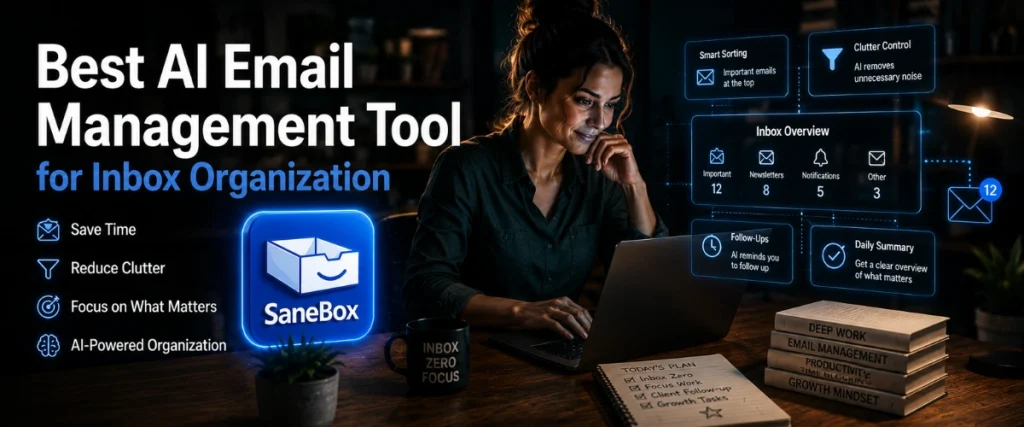
SaneBox Overview
If your inbox feels more like a storage cupboard than a communication tool, SaneBox is designed to bring some order to the chaos.
Unlike many email management software platforms, SaneBox doesn’t ask you to switch email providers or learn a completely new system. Instead, it works quietly in the background with Gmail, Outlook, Apple Mail, Yahoo Mail, and most other major email services.
That’s one of its biggest advantages.
You keep using the inbox you’re already familiar with while SaneBox handles much of the sorting and organization automatically.
The platform uses AI and automated email sorting to analyze incoming messages and determine which emails deserve your immediate attention and which can wait until later.
The result is a cleaner, less distracting inbox.
Its flagship feature is called SaneLater.
SaneLater automatically moves lower-priority messages into a separate folder while keeping important emails in your primary inbox. Instead of every email competing for your attention, the messages that genuinely matter are easier to spot.
For busy entrepreneurs, consultants, founders, and executives, that can make a surprisingly big difference.
After all, most people don’t have an email problem…
They have an attention problem.
The constant stream of incoming messages creates dozens of tiny interruptions throughout the day. Individually they seem harmless. Collectively they can destroy focus.
SaneBox helps reduce that noise.
According to the company, users save an average of around 2.5 hours per week through better email organization and inbox management.
Another benefit is the simplicity of getting started.
There are no complicated rules to build, no software to install, and no lengthy setup process. Most users can connect their account and start using the platform within a few minutes.
Key Benefits
The biggest strength of SaneBox isn’t that it helps you write emails faster.
It’s that it helps you spend less time dealing with email in the first place.
Some of the most useful benefits include:
- AI-powered email filtering and prioritization
- Automatic sorting of low-priority messages
- Works with Gmail, Outlook, Apple Mail, Yahoo Mail, and more
- Quick setup with no software installation required
- Reduces inbox clutter and distractions
- Helps create a more efficient email workflow
Beyond SaneLater, the platform includes several additional tools designed to improve inbox management.
SaneBlackHole allows you to permanently block unwanted senders with a single action.
SaneReminders can notify you if someone hasn’t replied to an important email.
Snooze folders let you temporarily remove messages from your inbox and have them reappear exactly when you want to deal with them.
Together, these features help transform email from a constant source of interruption into something that’s much easier to control.
SaneBox Pros and Cons
- Works with existing Gmail and Outlook accounts
- Strong AI-powered inbox management
- Easy setup process
- Helpful follow-up reminders
- Doesn't require changing email providers
- Takes a little time to learn your preferences
- Focuses on email organization rather than AI writing
- Advanced features require higher-tier plans
Who Is SaneBox Best For?
SaneBox is an excellent fit for entrepreneurs, founders, consultants, executives, and anyone receiving a high volume of email.
If your goal is inbox zero, better email organization, and fewer distractions throughout the day, it’s one of the strongest options available.
It’s particularly appealing for users looking for email management software for Gmail or email management software for Outlook without switching to an entirely new email client.
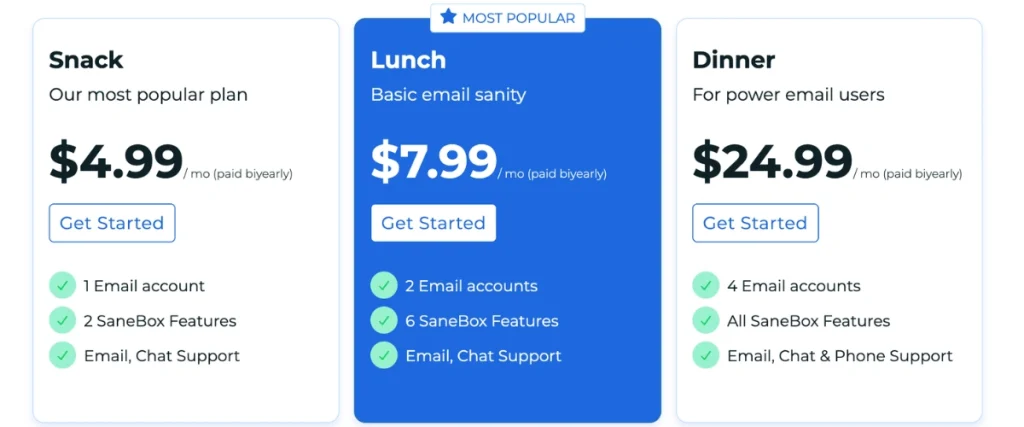
SaneBox Pricing
SaneBox offers a free 14-day trial.
Paid plans start at $7 per month, with larger plans available for users who need additional features or support for multiple email accounts. That said, you can get $15 off SaneBox via this link here.
Verdict
Many AI tools focus on helping you create more email.
SaneBox focuses on helping you see less of the email that doesn’t matter.
For most entrepreneurs, that’s often the bigger problem.
If you want a smarter inbox, fewer distractions, and a simple way to improve email productivity, SaneBox is one of the best AI tools for email management currently available.
That’s why it earns the top spot on this list.
2. Superhuman: Best for Email Power Users

Superhuman Mail Overview
Some people check email a few times a day.
Others practically run their business from their inbox.
If you’re in the second group, Superhuman was built with you in mind.
Unlike traditional email inbox management tools, Superhuman is a premium email client designed around speed. Everything from the interface to the keyboard shortcuts is built to help users move through email faster and with less friction.
Think of it as the Formula One car of email.
Fast, powerful, and designed for people who spend a lot of time behind the wheel.
The platform works with Gmail and Outlook and includes AI-powered features that can help draft emails, summarize conversations, and streamline communication.
Rather than simply organizing messages, Superhuman aims to improve the entire email experience.
For founders, sales professionals, recruiters, and executives who spend hours each day managing conversations, those small efficiency gains can quickly add up.
One thing worth noting, however, is that Superhuman replaces your existing email interface.
That can be a positive or a negative depending on your preferences.
Some users love the streamlined experience.
Others may prefer a solution that works alongside their current inbox rather than replacing it.
Key Benefits
Superhuman is designed to remove as much friction from email as possible.
Some of its standout features include:
- AI-assisted email drafting
- AI conversation summaries
- Split inbox functionality
- Follow-up reminders
- Read receipts
- Fast keyboard shortcuts
- Gmail and Outlook support
One of the platform’s biggest strengths is how quickly users can move through large volumes of email.
Rather than constantly clicking menus and navigating folders, many common actions can be performed using keyboard shortcuts. Once learned, the workflow feels remarkably efficient.
The AI features also help reduce some of the repetitive work involved in managing communication.
Need to catch up on a long email thread?
Conversation summaries can help.
Need to draft a response?
The AI can provide a starting point.
It’s not about replacing human communication. It’s about reducing the administrative work around it.
Superhuman Mail Pros and Cons
- Extremely fast email workflow
- Strong AI writing assistance
- Excellent keyboard shortcuts
- Helpful conversation summaries
- Works with Gmail and Outlook
- Premium pricing
- Learning curve for new users
- Requires switching to a new email interface
Who Is Superhuman Mail Best For?
Superhuman is best suited for founders, executives, sales professionals, recruiters, and anyone who spends a significant portion of their working day managing email.
If your inbox is one of your primary work tools, the productivity gains can be substantial.
If you only check email a few times a day, it may be more tool than you actually need.
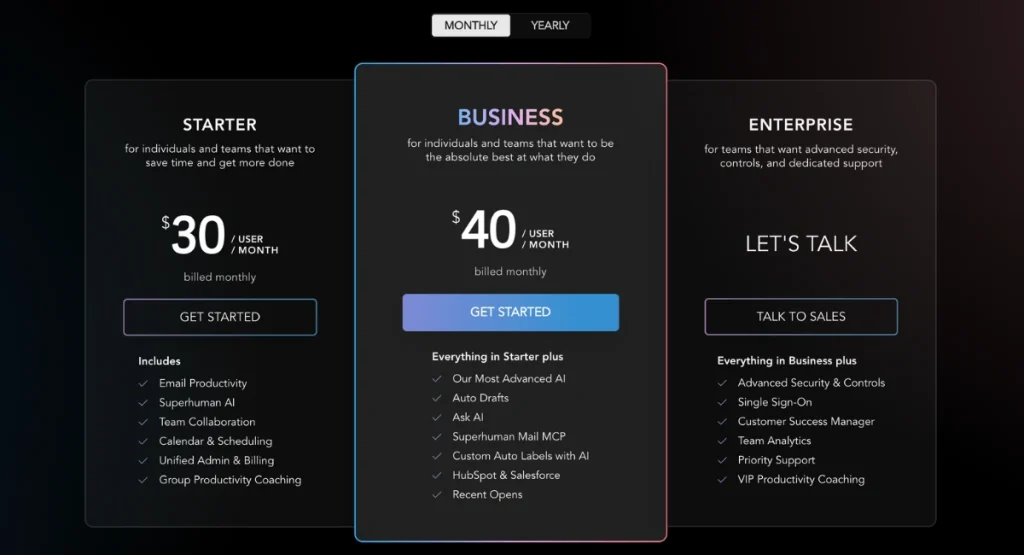
Superhuman Mail Pricing
Superhuman offers a free trial and several premium plans.
Because pricing and features change periodically, it’s worth checking the latest plans directly before making a purchasing decision.
Verdict
Superhuman isn’t trying to create a calmer inbox.
It’s trying to create a faster one.
For heavy email users, that distinction matters.
If you’re looking for a high-performance email client that helps you move through messages more efficiently, Superhuman is one of the strongest options on the market.
3. Shortwave: Best for Gmail Users
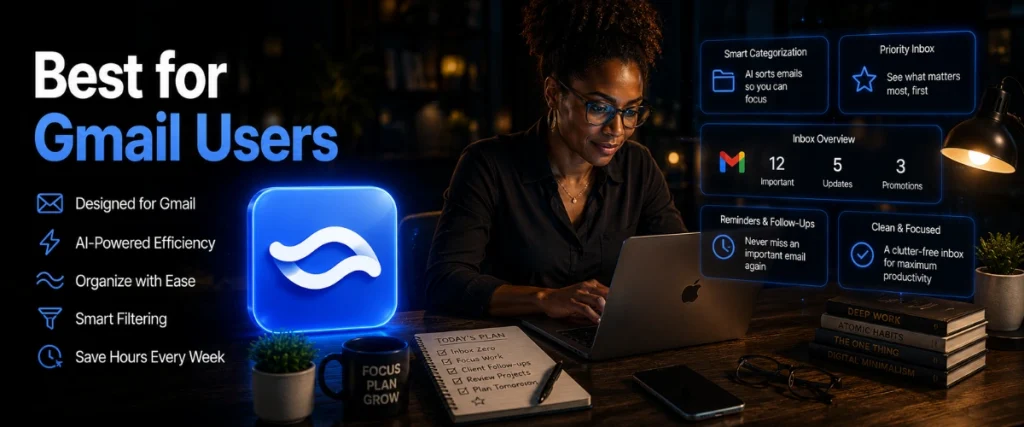
Shortwave Overview
If Gmail feels a little dated but you don’t want to abandon it completely, Shortwave offers an interesting middle ground.
Built specifically for Gmail users, Shortwave combines a familiar email foundation with modern AI features designed to help you organize, read, search, and respond to messages more efficiently.
The platform focuses heavily on reducing information overload.
One way it does this is through AI-powered email summaries.
Instead of reading every message in a lengthy thread, Shortwave can generate concise summaries that highlight the most important points.
That might not sound revolutionary until you’re staring at a conversation containing twenty replies and trying to work out what actually happened.
Shortwave also introduces email bundling.
Related emails are grouped together automatically, helping reduce inbox clutter and making your inbox feel more manageable.
Rather than scrolling through a long list of disconnected messages, conversations are organized into cleaner, more structured groups.
The overall experience feels modern and intentionally designed around today’s communication habits.
If you’re building a broader AI productivity stack, you may also want to explore some of the best ChatGPT plugins for productivity.
Key Benefits
Some of Shortwave’s most useful features include:
- AI-generated email summaries
- AI drafting assistance
- Email bundling
- Smart inbox organization
- Powerful search functionality
- Mobile and desktop apps
One of the biggest benefits is simply reducing the amount of reading required.
Many entrepreneurs spend large portions of the day processing information.
Shortwave helps surface the information that matters most while hiding some of the noise.
This allows users to stay informed without feeling buried beneath endless email threads.
Shortwave Pros and Cons
- Excellent AI-powered features
- Strong Gmail integration
- Helpful email summaries
- Modern interface
- Good value for money
- Primarily built for Gmail users
- Requires moving away from the standard Gmail interface
- Some advanced features are restricted on lower plans
Who Is Shortwave Best For?
Shortwave is ideal for entrepreneurs, consultants, creators, and small business owners who rely heavily on Gmail and want a smarter inbox experience.
It’s particularly appealing for people who like the idea of AI assistance but don’t necessarily need the complexity or cost of premium enterprise-focused solutions.
Shortwave Pricing
Shortwave offers a free plan for individual users.
Paid plans unlock additional AI usage, advanced features, and collaboration capabilities for teams.

Verdict
Shortwave strikes a nice balance between simplicity and functionality.
Its AI features feel genuinely useful rather than gimmicky, and the Gmail integration makes adoption relatively straightforward.
For Gmail users looking for a modern AI inbox assistant, it’s one of the strongest choices available today.
4. Mailman: Best for Protecting Focus Time

Mail Man Overview
Most email tools focus on helping you process your inbox more efficiently.
Mailman takes a different approach.
Instead of helping you manage interruptions better, it helps prevent many of them from happening in the first place.
That distinction matters.
Every time a notification appears on your screen, your attention shifts.
You glance at the message.
You quickly check who sent it.
You tell yourself you’ll only look for a second.
Ten minutes later, you’re still in your inbox.
Mailman is designed to break that cycle.
The platform works with Gmail and Outlook and allows users to schedule when incoming emails are delivered. Messages can be held back and delivered in batches throughout the day, helping create uninterrupted blocks of work.
Think of it as a gatekeeper standing between you and your inbox.
Important people can still get through.
Everyone else waits until the scheduled delivery time.
This approach is particularly useful for entrepreneurs, writers, consultants, developers, and anyone whose work requires concentration.
A growing body of research suggests interruptions can have a surprisingly large impact on productivity. Research from the University of California Irvine on workplace interruptions found that frequent interruptions can significantly affect focus and workflow.
Mailman aims to solve exactly that problem.
Key Benefits
Some of Mailman’s most useful features include:
- Scheduled inbox delivery
- Focus time protection
- VIP sender management
- Custom delivery schedules
- Reduced email interruptions
- Gmail and Outlook support
One of the biggest benefits is that you regain control over when email enters your day.
Rather than constantly reacting to incoming messages, you can process them on your own schedule.
For many entrepreneurs, that’s a surprisingly powerful shift.
Mail Man Pros and Cons
- Excellent for deep work
- Reduces distractions
- Works with existing email accounts
- Easy to implement
- Less focused on AI features
- Doesn't replace your email client
- More specialized than some competitors
Who Is Mail Man Best For?
Mailman is best for entrepreneurs, freelancers, consultants, writers, and knowledge workers who regularly find themselves distracted by email notifications throughout the day.
If your biggest challenge isn’t inbox organization but maintaining focus, Mailman may be a better fit than some of the more traditional email productivity tools on this list.
That said, if staying focused is something you struggle with, you might also find our guide to productivity hacks for solopreneurs helpful.
Mail Man Pricing
Mailman offers a free trial, with paid plans available depending on your requirements and the number of email accounts you connect.

Verdict
Mailman solves a different problem than most inbox management tools.
Rather than helping you process email faster, it helps you receive less of it during your most productive hours.
For anyone trying to protect focus time and reduce distractions, that can be incredibly valuable.
5. Clean Email: Best for Inbox Cleanup

Clean Email Overview
If your inbox has become a digital attic full of newsletters, promotions, receipts, and emails you forgot existed years ago, Clean Email can help you clear the clutter.
Where SaneBox focuses on ongoing email organization and prioritization, Clean Email focuses on helping users clean up large volumes of existing email and keep things tidy moving forward.
The platform uses smart filtering and automation to identify groups of similar emails, making it possible to process hundreds or even thousands of messages at once.
Instead of manually deleting messages one by one, you can clean entire categories of email with a few clicks.
For anyone dealing with inbox overload, that’s a huge advantage.
Clean Email also includes strong unsubscribe management tools.
Many people don’t actually have too much email.
They simply have too many unwanted emails.
Clean Email helps tackle that problem at the source by making it easier to stop unnecessary messages from arriving in the first place.
If you’re trying to clean up Gmail, Outlook, or another busy inbox, the platform can save a considerable amount of time.
Key Benefits
Some of Clean Email’s most useful features include:
- Bulk email cleanup
- Smart folders
- Unsubscribe management
- Automated cleanup rules
- Inbox organization tools
- Gmail and Outlook support
One of the biggest advantages is speed.
Tasks that could take hours manually can often be completed in minutes.
This allows users to regain control of their inbox without spending an entire afternoon sorting old emails.
Clean Email Pros and Cons
- Excellent for large inbox cleanups
- Strong unsubscribe management
- Helpful automation features
- Easy bulk actions
- Less focused on ongoing email prioritization
- Not a complete email client
- Fewer AI-focused features than some competitors
Who Is Clean Email Best For?
Clean Email is ideal for people dealing with years of accumulated inbox clutter.
If your inbox contains thousands of unread messages, excessive newsletters, or promotional emails you never seem to get around to deleting, this platform can help you quickly regain control.
Clean Email Pricing
Clean Email offers a free plan with limited functionality.
Paid plans unlock additional cleanup tools, automation features, and larger processing limits.

Verdict
Clean Email won’t necessarily change the way you handle email every day.
What it will do is help you start with a much cleaner slate.
If inbox cleanup is your primary goal, it’s one of the strongest tools available.
Which AI Email Management Tool Is Best?

Choosing the right platform comes down to the specific problem you’re trying to solve.
Some people need better email organization.
Others need faster workflows.
Some simply need fewer interruptions.
Here’s a simple way to think about it.
Choose SaneBox if…
You want a smarter inbox without changing your existing email provider.
SaneBox is ideal for entrepreneurs who want better email organization, automated email sorting, fewer distractions, and a more manageable inbox.
Choose Superhuman if…
Email is one of your primary work tools.
Superhuman is designed for people who spend several hours a day inside their inbox and want to move through messages as quickly as possible.
Choose Shortwave if…
You use Gmail and want an AI-powered inbox experience with summaries, drafting tools, smart organization, and modern productivity features.
Choose Mailman if…
Interruptions are hurting your productivity.
Mailman helps create protected blocks of deep work by controlling when email reaches your inbox.
Choose Clean Email if…
Your inbox needs a serious clean-up.
Its unsubscribe management and bulk cleanup tools make it one of the quickest ways to tackle years of accumulated email clutter.
Interestingly, productivity researchers have long highlighted the cost of constant digital interruptions. According to McKinsey’s research on digital communication and productivity, knowledge workers spend a significant portion of their week managing communication and searching for information. Tools that reduce unnecessary inbox noise can help reclaim some of that time.
| Tool | Best For | Starting Price | Free Trial |
|---|---|---|---|
| SaneBox | Best Overall | $7/month | Yes |
| Superhuman | Email Power Users | Premium Pricing | Yes |
| Shortwave | Gmail Users | Free Plan Available | Yes |
| Mailman | Focus Time | Free Trial Available | Yes |
| Clean Email | Inbox Cleanup | Free Plan Available |
Final Verdict
The best AI email management tools all solve different problems.
Some focus on writing emails faster.
Others focus on inbox cleanup, email organization, focus time, or workflow optimization.
For most entrepreneurs, however, the biggest challenge isn’t sending email.
It’s managing the constant stream of incoming messages competing for attention throughout the day.
That’s why SaneBox stands out as the strongest overall option.
It helps prioritize important conversations, reduce inbox clutter, improve email organization, and create a calmer, more manageable workflow without requiring users to abandon Gmail, Outlook, or their existing setup.
That said, every platform on this list has clear strengths.
Superhuman is an excellent choice for email power users.
Shortwave is one of the most compelling options for Gmail users looking for a smarter inbox.
Mailman excels at protecting focus time.
And Clean Email is ideal for anyone trying to reclaim control of an overcrowded inbox.
Ultimately, the right choice depends on your workflow, your goals, and the specific challenges you’re trying to solve.
Once you’ve got your inbox under control, you might also be thinking about the other side of email: sending it. If you’re comparing platforms, check out our guide to the best autoresponders for email marketing, where we compare the leading options for businesses and creators.
Frequently Asked Questions
What is the best AI email management tool?
For most entrepreneurs, SaneBox offers the best balance of inbox management, email organization, automated email sorting, and productivity features.
Because it works with existing email providers, it’s also one of the easiest solutions to adopt.
Can AI organize my inbox automatically?
Yes.
Many modern AI email management tools can automatically sort incoming messages, prioritize important emails, filter low-priority content, and help reduce inbox clutter.
Does SaneBox work with Gmail and Outlook?
Yes.
SaneBox works with Gmail, Outlook, Apple Mail, Yahoo Mail, and many other popular email services.
This makes it a flexible option for users looking for email management software for Gmail or email management software for Outlook.
Are AI email management tools worth it?
For people receiving a large volume of email, they often are.
The time saved through better inbox management, fewer distractions, improved email organization, and more efficient workflows can quickly outweigh the cost of the software.
What’s the difference between SaneBox and Superhuman?
SaneBox focuses on inbox management and prioritization while working with your existing email provider.
Superhuman is a premium email client designed to help users process email faster through workflow optimization, keyboard shortcuts, and productivity features.
Can AI help reduce email overload?
Yes.
AI-powered inbox management tools can automatically filter less important messages, surface priority conversations, assist with email organization, and reduce the amount of manual work required to maintain a healthy inbox.
What are the best email management software options for Gmail users?
Some of the strongest options include SaneBox, Shortwave, Mailman, Superhuman, and Clean Email.
The best choice depends on whether your goal is inbox organization, AI assistance, focus time, email productivity, or inbox cleanup.

Steve West is the founder of entrepreneurnut.com, and has been working online since 2013. He specializes in SEO, YouTube, and affiliate marketing. Besides running his online business, he likes hiking, keeping fit, and eating cookies (which is why he needs to keep fit!)