
This blog is reader supported. If you click one of our links and make a purchase, we may receive a commission at no extra cost to you. In that event we thank you so much, for supporting our blog, it means the world to us. Have a great day!
Last Updated on 20th October 2026

Kartra Pricing – Features, Usage Limits and Best Deal
Confused by Kartra pricing and wondering why picking the cheapest plan feels a bit like choosing the smallest parachute?
Yep, the cheapest plan is actually not the cheapest.
In this guide you’ll see all four plans compared side by side, what that Essentials plan 5% fee really costs you as sales grow, which limit you’re likely to hit first, and which plan actually makes sense for most new businesses.
Key Takeaways
- Essentials looks cheap at $59/mo, but it’s the only plan with a 5% transaction fee.
- Starter at $119/mo is the sensible default for most sellers because it removes the fee and unlocks unlimited pages and products.
- Growth suits you when you need more contacts, affiliate tools and a helpdesk.
- Professional is built for larger teams with higher contact volumes and live chat support.
- Kartra offers a 14-day trial on any plan plus a 30-day money-back guarantee.
- There’s no permanent free plan, so pick the plan you can grow into without overpaying early.
Kartra Pricing At A Glance
Kartra price plans spans $59/mo to $549/mo for monthly billing, or $52/mo to $429/mo if you pay annually. There are four price points for Kartra and they all include unlimited forms, the funnel mapper, advanced analytics, checkouts and 100 pre-built campaigns.
So what actually changes?
It’s contacts, sending limits, fees and how much you can build and sell.
And look, here’s the quick comparison so you can spot the gaps.
| Plan | Monthly | Annual (per month) | Contacts | Emails + SMS | Transaction fee |
|---|---|---|---|---|---|
| Essentials | $59/mo | $52/mo | 500 | 10,000 per month | 5% |
| Starter (Best Value) | $119/mo | $99/mo | 2,500 | Unlimited | 0% |
| Growth | $229/mo | $189/mo | 12,500 | Unlimited | 0% |
| Professional | $549/mo | $429/mo | 25,000 | Unlimited | 0% |
Now, Essentials gives you 1 custom domain, 5 pages, 1 product, 1 membership or course, and 30 Kartra AI uses. Starter jumps to 1 custom domain, unlimited pages, products and memberships or courses, 100 Kartra AI uses and 5 team members.
You’ve also got video hosting and calendars with Starter, which Essentials doesn’t include. Growth adds 3 custom domains, 10 team members and 250 Kartra AI uses.
You’ll also unlock funnel simulation, automations, affiliate management, surveys and quizzes, plus helpdesk with Growth. Professional moves to 5 custom domains and 25,000 contacts.
Professional adds real-time funnel analytics and helpdesk live chat for busier support queues. All Kartra plans come with a 14-day trial and a 30-day money-back guarantee.
And look, you can cancel anytime.
Kartra Essentials Plan
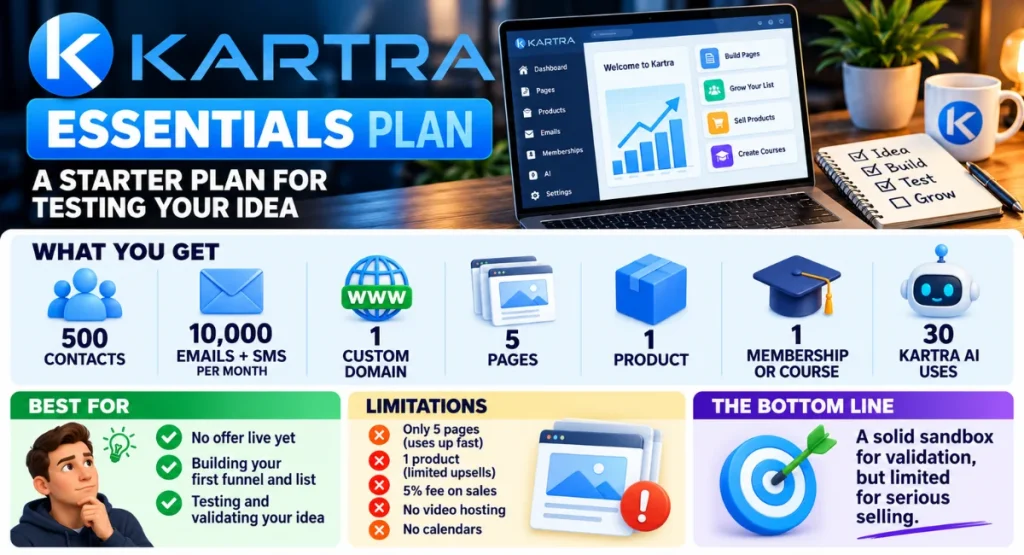
Essentials is Kartra’s starter taste, built for testing an idea before you’ve got regular sales. So, have you got an offer live yet?
Not yet.
Then Essentials is basically your sandbox.
Right, you get 500 contacts and 10,000 emails plus SMS per month. That’s plenty for a tiny list while you’re validating.
You can build a small audience, send regular follow-ups, and learn what messaging gets a reply without paying for capacity you don’t need.
You also get 1 custom domain, 5 pages, 1 product and 1 membership or course. Plus you’ve got 30 Kartra AI uses for drafting and brainstorming.
Essentials won’t carry your whole content engine, but that’s not really the point at this stage.
So, who’s this plan actually best for?
It’s for someone with no offer live yet who’s building a first funnel and list.
If you’re mapping a funnel, writing welcome emails, and trying to get initial traction, Essentials gives you enough room to move.
However, where it bites is pretty quick, and this is the important part.
Five pages disappears pretty fast once you’ve got a homepage, opt-in, sales page, checkout and thank you page. One product means no order bump playground, and that 5% fee starts hurting the moment money comes in.
And look, no video hosting means hosting course videos elsewhere. No calendars means booking calls with another tool.
For pure validation, that’s tolerable. For selling, it’s pretty cramped.
Kartra Starter Plan

Now, Starter is the plan most readers should buy, and Kartra badges it Best Value for good reason. So, if you’re ready to sell, then this is it?
You get 2,500 contacts with unlimited email and SMS. That removes the monthly counting worry while you’re growing.
You can welcome new subscribers properly. You can promote consistently without watching a meter.
You get 1 custom domain, unlimited pages, unlimited products and unlimited memberships or courses. You’ve also got 100 Kartra AI uses, 5 team members, video hosting and calendars.
Right, that combination genuinely changes how you work.
Video hosting means your course and marketing videos can live where you sell. Calendars mean discovery calls and coaching sessions stay in the same system as your pages and email.
You can test extra offers, add a course, host videos natively and let a VA or partner jump in.
So do you want to try a new lead magnet?
Just build it.
Do you want to spin up a variant of your sales page?
Then just clone it.
And here’s the bit that matters, the big win is 0% transaction fees.
If you’re selling anything regularly, that alone often pays for the jump from Essentials.
Starter fits the new seller with momentum. Think creators launching a first course, coaches filling a calendar, and small shops moving from sporadic sales to steady promotion.
With unlimited pages and products, you can iterate instead of deleting.
Now, where does it bite?
Mostly when you outgrow single-brand simplicity.
You still have 1 custom domain, so separate brands need a workaround. And 2,500 contacts feels pretty roomy until list building works really well.
Kartra Growth Plan

Growth is for businesses that are already selling and starting to feel a bit squeezed.
So, are you actually feeling the squeeze?
Then that’s the signal.
You get 12,500 contacts with unlimited email and SMS. That’s five times Starter’s contact allowance, so you’ve got room to scale campaigns.
You can run regular promotions to a larger list. You can segment buyers from prospects.
You get 3 custom domains, 10 team members and 250 Kartra AI uses. Other Kartra plans don’t include funnel simulation, automations, affiliate management, surveys and quizzes, or helpdesk at this level.
Funnel simulation helps you map logic before you launch. Automations carry the follow-up when volume rises.
Surveys and quizzes help you segment and personalise without manual tagging marathons.
This suits you if affiliates will drive sales for you. Affiliate management plus automations means you can recruit partners and follow up without duct-taping extra tools together.
That matters when partners need links, assets, and timely payouts communication.
It also suits you if support tickets are piling up. A proper helpdesk beats an overflowing inbox like a filing cabinet beats a shoebox.
You can assign, track, and close tickets without losing them in personal email. With 10 team members, support, content, and fulfillment can work in the same place without sharing logins.
Now, where does it bite?
Mostly on focus.
If you don’t have traffic, affiliates, or ticket volume yet, you’ll be paying for headroom you aren’t using. If you do, it feels like breathing again.
Kartra Professional Plan

Professional is Kartra’s top tier for established operations with volume.
So, are you running hot?
Then Professional is basically built for that.
You get 25,000 contacts with unlimited email and SMS and 0% fees. That’s double Growth for larger databases.
You can mail a substantial list daily during launches. You can keep buyers, leads, and long-term nurtures together.
You get 5 custom domains for separate brands or funnels. You’ve also got real-time funnel analytics and helpdesk live chat.
Real-time analytics is for decisions made mid-launch, not next week. Live chat is for support queues where waiting for an email reply costs sales.
So, who’s this plan actually best for?
It’s for teams running multiple offers who need faster insight and live support.
Real-time analytics helps you spot a dip in conversions while a launch is still live. Think a team juggling brands, offers, and support at once.
Think separate funnels that each need their own domain and their own reporting. The extra domains keep brands clean.
The extra contact allowance keeps list hygiene from becoming a daily emergency.
If you’re not there yet, don’t stretch for it.
You’ll know when you need Professional because contacts, domains and support load will tell you.
When the time comes, it’s relief, like finally upgrading from a backpack to a loading dock for your entire operation.
Why The 5% Transaction Fee Is The Real Kartra Cost
Only Essentials charges Kartra transaction fees, and that 5% changes the whole maths. Think of it like paying rent on every sale.
It feels small until your landlord takes a cut of your best month.
Here’s the step by step on monthly billing. Essentials costs $59/mo plus 5% of sales.
Starter costs $119/mo with no fee. The gap between them is $60.
So divide that $60 gap by 5% and you get $1,200.
And this is the important part, that’s your crossover point.
| Monthly sales | Essentials total cost | Starter total cost |
|---|---|---|
| $0 | $59 | $119 |
| $500 | $84 | $119 |
| $1,200 | $119 | $119 |
| $3,000 | $209 | $119 |
| $5,000 | $309 | $119 |
Pop in your numbers and you'll see what you'd actually pay on each plan. You'll know in seconds which one's cheaper for you.
So what if you sell $500 in a month on Essentials?
You’ll pay $25 in fees, so your total Kartra cost is $84.
So what if you sell $1,200?
You’ll pay $60 in fees, so your total Kartra cost hits $119.
So what if you sell $2,000?
You’ll pay $100 in fees, so you’re at $159.
That’s $40 more than Starter for a smaller plan with fewer features.
Ouch.
Annual billing tilts it even sooner. Essentials is $52/mo and Starter is $99/mo, so the gap is only $47.
At 5%, you overtake Starter at $940 in monthly sales. A single decent offer, promoted consistently, can cross it without a huge list.
If you’ve got an offer that sells, Starter’s cheaper in practice even though it looks pricier on the page.
Essentials is cheaper only while sales are tiny or nonexistent.
Which Kartra Limit Will You Hit First?
| Limit | Essentials | Starter | Growth | Professional |
|---|---|---|---|---|
| Contacts | 500 | 2,500 | 12,500 | 25,000 |
| Emails and SMS | 10,000/mo | Unlimited | Unlimited | Unlimited |
| Transaction fee | 5% | 0% | 0% | 0% |
| Custom domains | 1 | 1 | 3 | 5 |
| Pages | 5 | Unlimited | Unlimited | Unlimited |
| Products | 1 | Unlimited | Unlimited | Unlimited |
| Memberships and courses | 1 | Unlimited | Unlimited | Unlimited |
| Team members | Not included | 5 | 10 | 10 |
| Kartra AI uses | 30 | 100 | 250 | 250 |
Contacts usually bite first if you’re list building fast.
So, are you the list builder?
You publish, you promote, you run a lead magnet everywhere. Then Essentials caps you at 500 contacts.
Starter’s 2,500 gives you breathing room, while Growth’s 12,500 suits regular promotion.
Pages and products bite first if you’re a builder.
Okay so, are you the tinkerer?
You love new pages, new variants, new offers. Then Essentials allows 5 pages and 1 product.
Starter removes both caps, so you can experiment without rebuilding. With unlimited pages, products and memberships or courses, Starter lets you keep the winners and archive the losers.
Domains bite when you run separate brands.
So, are you the multi-brand operator?
Maybe you’ve got a personal brand plus a separate shop. Then Essentials and Starter include 1 custom domain.
If you want a second brand or a client project, you’ll need Growth’s 3 domains or Professional’s 5.
Team seats bite when you stop doing everything yourself.
So, are you the solo operator about to get help?
Starter includes 5 team members, Growth includes 10. If it’s just you plus a freelancer, Starter’s plenty.
AI uses and sending limits bite quietly in the background. Essentials gives you 30 Kartra AI uses.
Starter gives you 100 Kartra AI uses. Growth gives you 250 Kartra AI uses.
Essentials limits you to 10,000 per month. The higher plans give you Unlimited.
For most beginners, the order is fees, then pages, then contacts.
For a broader view of the category, see our roundup of the best sales funnel builder software.
Is Kartra Worth It For Your Business?
If you’re asking is Kartra worth it, it depends on how much all-in-one matters to you. Love having everything in one tab?
Then keep reading.
Kartra suits creators and small businesses who want pages, email, checkouts, courses, video and helpdesk in one place. That saves you stitching five subscriptions together and hoping they talk nicely.
It suits the funnel-first seller. Pages, checkouts, email follow-up, and automation live together.
That shortens the distance between click and customer.
It suits the course and membership owner. Unlimited memberships or courses on Starter and above means you can expand your library without replatforming.
Video hosting keeps lessons close to the checkout.
It suits the lean team. With 5 team members on Starter and 10 team members on Growth, you can share the load without sharing passwords.
It doesn’t suit you if you only need one piece. If you just want email, a dedicated email tool will be simpler.
If you just want courses, a course-only platform may feel lighter.
It also doesn’t suit the dabbler who will never sell. If there’s no product, no list, and no launch plan, even Essentials is shelfware.
It doesn’t suit the single-funnel minimalist who hates all-in-ones. Some people prefer best-in-class point tools wired together.
They enjoy the tinkering.
On Kartra vs Kajabi, Kajabi leans more toward creators selling courses and coaching, while Kartra leans more toward direct response funnels and automation. Are you selling transformation through curriculum?
Kajabi’s angle may resonate.
Are you selling through pages, bumps, upsells, and follow-up sequences?
Kartra’s angle may fit better.
If you’re building client work or an agency, how Kartra stacks up against GoHighLevel is a different conversation. GoHighLevel suits client accounts and reselling, while Kartra is built for selling your own courses and products.
A monthly platform fee’s just another running cost, so you’ll want to organise your budget around it up front with the SBA’s guide to calculating startup costs.
Software subscriptions are usually treated as an ordinary business expense, so you might realise the real cost’s a bit lower than the sticker price, and it’s worth checking the IRS guidance on deducting business expenses to see where you stand.
In plain terms: fewer tools means fewer surprises. Fewer surprises means easier budgeting.
That doesn’t make Kartra automatically right. It makes consolidation valuable when you’ll use the pieces.
For a deeper feature breakdown, read our full Kartra review.
How To Try Kartra Before You Pay
The Kartra free trial lasts 14 days and it’s available on any plan.
So, does that actually mean any plan?
Yes.
Pick the one you want to test and get full access for that window. You can use the Kartra free trial to build pages, test checkouts and see if the dashboard clicks for you.
So go build, click around, and break things a bit. See how it feels.
After that you’ve still got a 30-day money-back guarantee. You can cancel anytime if it’s not a fit.
Remember there’s no permanent free plan. And don’t mix up the two numbers.
It’s 14 days to try, then 30 days of money-back cover once you pay.