Skool vs Circle: Which Community Platform Is Best for Creators in 2026?


This blog is reader supported. If you click one of our links and make a purchase, we may receive a commission at no extra cost to you. In that event we thank you so much, for supporting our blog, it means the world to us. Have a great day!


Last Updated on 20th April 2026

If you’re comparing Skool vs Circle, you’re probably trying to avoid an expensive mistake.

Maybe you want to build a paid community, host courses, run live calls, and keep everything in one place. Or maybe you’re worried about choosing a platform that feels great now, but becomes limiting once your creator business grows.

That’s exactly where this comparison helps.

Both are strong community-building platforms, but they’re built for different kinds of creators. One leans into simplicity and fast setup. The other leans into flexibility, branding, and scale.

This guide breaks down what actually matters, so you can choose the right fit without getting lost in feature lists.

Table of Contents

Skool vs Circle: Key Takeaways

  • Skool is usually better for simplicity. It is easier to set up, easier for members to use, and works well for a simple paid community, mastermind, or coaching program.
  • Circle is usually better for flexibility. It gives you more control over community organization, membership tiers, branding options, and access management.
  • Skool wins on gamification. Its gamification features are built into the core experience, which can boost member engagement and community posts.
  • Circle wins on scalability. It is stronger for branded communities, multiple offers, more advanced learning experiences, and larger learning communities.
  • Pricing is not just the monthly fee. Transaction fees, subscription structure, and the need for external tools can change the real cost quite a bit.
  • For most beginners, Skool feels easier. For creators planning a more premium or complex ecosystem, Circle often makes more sense long term.

What Is Skool? A Simple Community Platform for Courses and Engagement

What is Skool?

Skool is a community platform built for creators who want to combine a community, courses, and live calls in one simple place.

The reasons why people use Skool

It is one of the most popular online community platforms for coaches, consultants, and online course creators who want to create a community without a lot of technical setup.

Instead of giving you lots of menus, hidden settings, or endless layout options, Skool keeps things tight.

You get:

  • A Community feed for discussion
  • A Classroom tab for course creation and video lessons
  • A calendar for live events
  • A members area with member profiles
  • A leaderboard that powers its built-in gamification features

That simple setup is the main appeal.

For a lot of creators, it feels a bit like a cleaner, more focused Facebook group mixed with a lightweight course builder.

And that’s exactly why it has become so popular.

Who founded Skool?

Skool is closely associated with Sam Ovens, who is widely known as the public face and co-founder of the platform. Skool’s company profile also lists it as a Los Angeles-based business founded in 2019.

It also got a big visibility boost after Alex Hormozi publicly partnered with and promoted the platform, which helped push Skool further into the creator and coaching space.

That matters because Skool is not trying to be everything for everyone.

It is clearly built for creators selling transformation, education, accountability, and group-based offers.

How does Skool work?

At a high level, Skool is designed around one central idea:

Keep community interaction simple so people actually use it.

When someone joins, they create a Skool Account, enter your group, and immediately see the main community feed.

That feed is where most of the action happens.

You can publish:

  • community posts
  • prompts
  • announcements
  • wins
  • questions
  • discussion threads

This is great because it reduces friction.
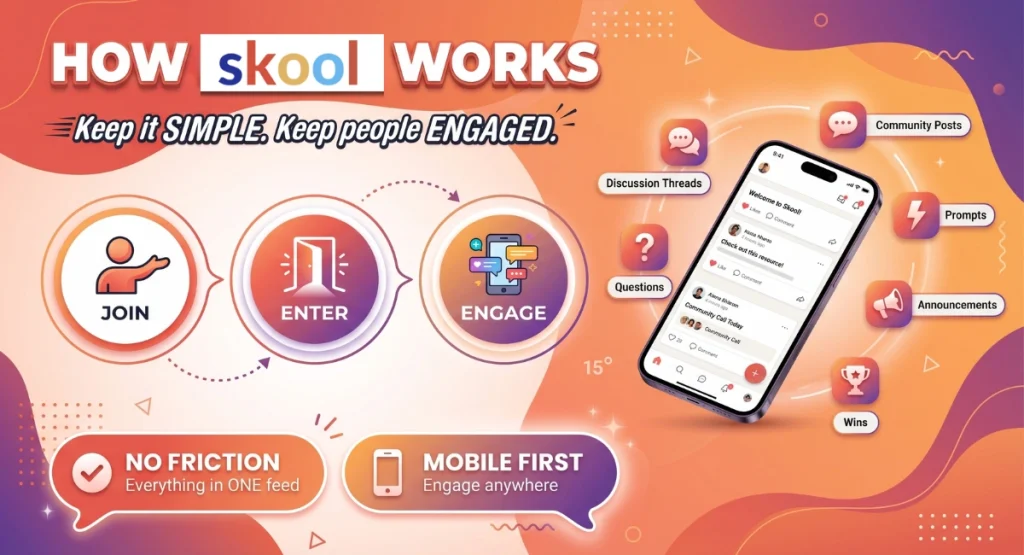
How the Skool community platform works

Members do not have to figure out where everything lives on the Skool platform. They can just log in, see what is happening, and join the conversation.

That tends to help with mobile engagement, especially for people who mostly interact on their phone.

What features does Skool include?

Skool keeps its community features intentionally lean, but it still covers the basics most creators need.

1. Community feed

This is the heart of the platform.

Instead of multiple spaces, Skool uses a single feed with categories. That means your community posts all live in one main place, which makes it feel lively and active.

For many creators, this feels familiar because it resembles a Facebook group, but with less distraction and better focus.

2. Classroom and course builder

Skool includes a built-in course builder for course creation.

You can upload or embed video lessons, organize modules, and drip out learning materials over time.

This works well for:

  • simple online courses
  • coaching programs
  • challenge-based learning communities
  • resource libraries
  • onboarding content

It is not trying to be a full LMS.

But for many creators, that is actually a benefit.

Less clutter. Faster launch.

3. Gamification and leaderboard

This is where Skool really stands out.

Its gamification features are not an add-on. They are built into the platform itself.

Members can earn points through engagement, unlock levels, and move up the leaderboard.

That creates a light sense of competition, which can help increase community posts, replies, and overall member engagement.

For some learning communities, this is a big win.

Especially if your offer depends on people showing up consistently.

4. Calendar and live calls

Skool also includes a calendar for live events.

On lower plans, many creators still rely on external tools like Zoom or Google Meet for live sessions. On higher plans, Skool adds more native options.

That setup is fine for many creators, but it is worth noting if you want a more polished all-in-one experience.

Is Skool good for course creation?

Yes, if your course is community-led and fairly simple.

Skool is strong for course creation when your goal is to combine:

  • community
  • accountability
  • weekly calls
  • learning resources
  • simple content delivery

It works especially well for:

  • group coaching
  • masterminds
  • cohort offers
  • beginner education products
  • recurring community memberships

If you need advanced assessment tools, certificates, deep content management, or a more traditional academic setup, Skool can feel limited.

But if your goal is to deliver useful training inside an active community, it often does the job nicely.

Skool at a glance

Here is the simple version.

Skool is best described as a streamlined community platform for creators who want:

  • easy setup
  • strong community interaction
  • simple course creation tools
  • live calls
  • member profiles
  • built-in gamification
  • fewer moving parts

That simplicity is the product.

And for the right creator, that is powerful.

Skool Pros and Cons
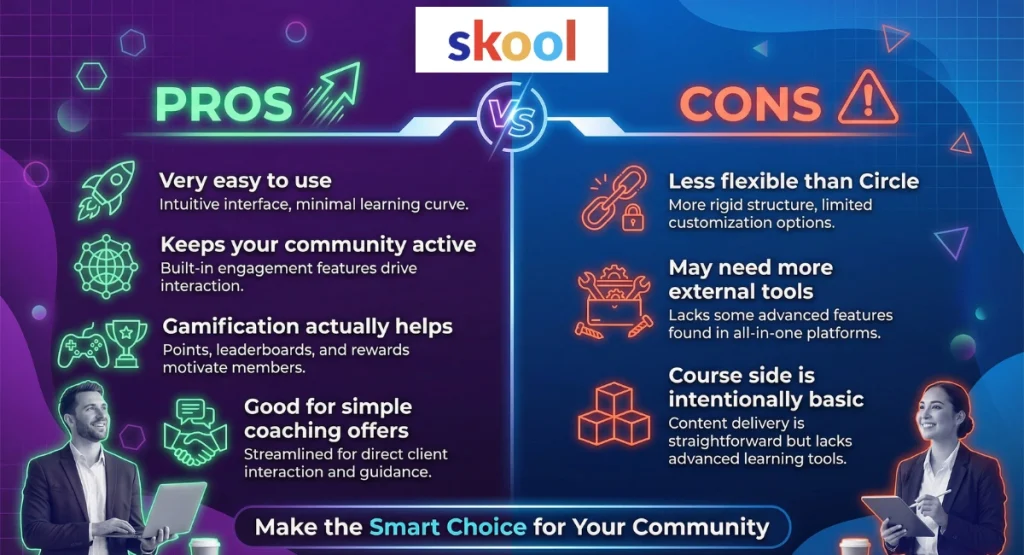
The pros and cons of Skool explained in an infographic

Skool Pros

1. It is very easy to use

Skool’s user interface is one of its biggest strengths.

Most people can join and understand it in minutes, which is great because a simpler experience usually means better participation.

2. It keeps your community active

The single-feed design encourages regular community posts, comments, and replies.

That can be especially helpful if you want a community that feels alive instead of fragmented.

3. The gamification actually helps

Skool’s built-in points, levels, and leaderboard are not just decorative.

They create a simple reward loop that can increase engagement without you needing to manually run automated rewards or complex systems.

4. It is good for simple coaching offers

If you run group coaching, weekly calls, or accountability-based coaching programs, Skool makes a lot of sense.

It is built for fast delivery, not endless setup.

Skool Cons

1. It is less flexible than Circle

Skool works best on a subscription basis, but it is much less flexible when you want multiple products, different access paths, or more advanced community organization.

That can become limiting as your business grows.

2. You may need more external tools

For more advanced email marketing, funnels, automations, and deeper workflows, many creators still rely on external tools.

That means the low monthly price does not always tell the full story.

3. The course side is intentionally basic

Its course builder is useful, but the course creation tools are fairly lightweight.

That is often fine for simple learning communities, but not ideal if you want richer learning experiences.

Who Is Skool Best For? Best Fit for Simple Paid Communities and Coaching Programs

Who should choose Skool?

Skool is best for creators who want a simple paid community that is easy to launch, easy to manage, and easy for members to actually use.

That is the short answer.

If your main goal is to get people into one place, keep them engaged, and deliver content without overcomplicating things, Skool is often a strong fit.

Skool is best for these types of creators

1. Creators launching their first paid community

If this is your first time trying to Create A Community, Skool is appealing because the setup is straightforward.

You are not spending hours trying to Create Space after Create Space, setting permissions, or building a complex member journey before you even open the doors.

You can move quickly.

That matters.

A lot of creators never launch because they get stuck in setup mode.

2. Coaches running simple group offers

Skool works especially well for:

  • group coaching
  • accountability communities
  • mastermind groups
  • habit-based programs
  • recurring support memberships

If your offer is built around weekly calls, community check-ins, shared wins, and a library of video lessons, Skool fits naturally.

This is great because your members are not jumping between five different online platforms just to stay involved.

3. Creators who want engagement more than customization

If your priority is:

  • more replies
  • more member activity
  • more consistent check-ins
  • more visible wins

…Skool has an edge.

Its built-in leaderboard and community-first design are built for member engagement.

That is one reason so many creators use it for learning communities and coaching programs rather than just static course delivery.

When Skool may not be the best fit

Skool is less ideal if you want:

  • multiple membership tiers
  • advanced email marketing
  • strong branding options
  • deep workflow automation
  • more advanced access rules
  • a fully branded experience

It can absolutely work for a lean creator business.

But if you want a more premium, layered ecosystem with different offers, access levels, and a polished brand feel, you may outgrow it faster than you expect.

Skool best-for summary

Choose Skool if you want simplicity, speed, and engagement.

It is especially strong for:

  • first-time community builders
  • simple paid learning communities
  • recurring coaching communities
  • creators who want fewer moving parts
  • creators who care more about participation than customization

If that sounds like you, Skool makes a lot of sense.

What Is Circle? A More Flexible All-in-One Platform for Branded Learning Communities

What is Circle?

Circle is a more advanced community platform built for creators who want more structure, more control, and more ways to grow a branded community over time.
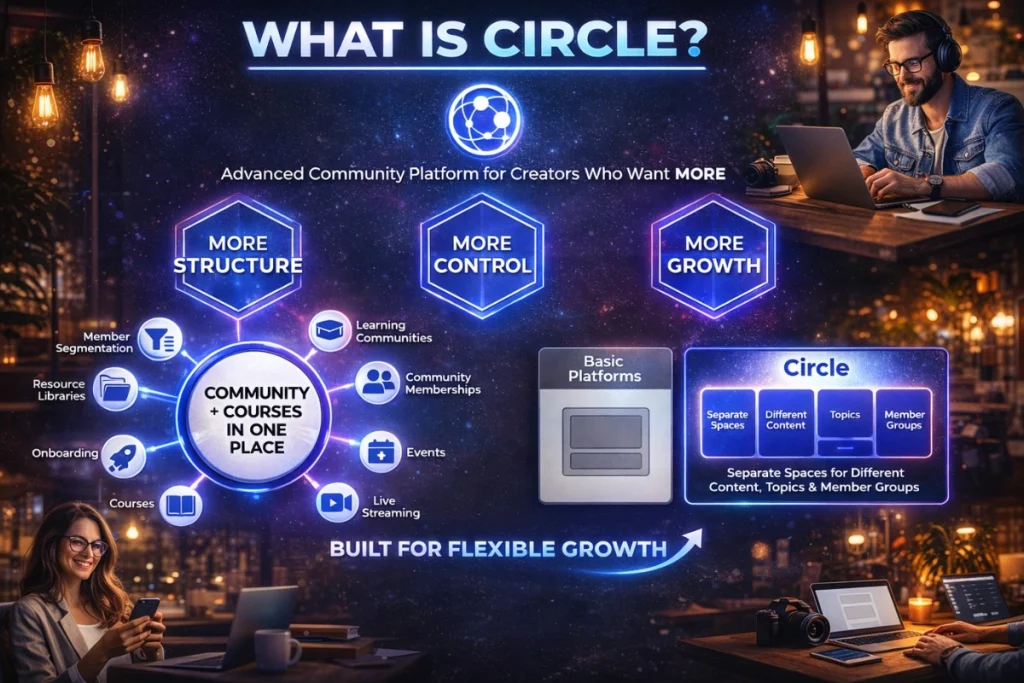
The features of Circle and why people use it

Like Skool, it helps you combine community and course creation in one place.

But the experience is very different.

Instead of one main feed, Circle lets you build a more organized environment using separate spaces for different content types, topics, and member groups.

That is a big deal.

It means Circle is not just built for “one community plus one course.”

It is built for creators who want a more flexible system for:

  • learning communities
  • community memberships
  • events
  • live streaming
  • courses
  • onboarding
  • resource libraries
  • member segmentation

In simple terms, Skool feels like a focused community room.

Circle feels more like a full community hub.

How does Circle work?

Circle’s structure is based around Spaces and Space Groups.

A Create Space workflow lets you build separate areas for different types of content or different types of members.

For example, you might create:

  • a general discussion area
  • a wins and introductions space
  • a Q&A space
  • a resource library
  • a course space
  • a private VIP member area
  • a live events hub

Then you can organize those inside Space Groups.

This is excellent for community organization because it gives your members clearer paths and reduces feed chaos as your community grows.

It also makes Circle stronger for creators who want different access levels inside the same ecosystem.

How the Circle community platform works

What features does Circle include?

Circle is much broader than Skool in terms of community-building features.

1. Structured community spaces

This is the biggest difference.

Circle lets you separate content by topic, content type, or audience segment.

That improves community management and can make larger communities feel more organized.

It also supports better access management, because different members can see different spaces depending on what they bought.

2. Course builder and course delivery

Circle also includes a built-in course builder for course creation.

You can build lessons, organize modules, host video lessons, and create more structured learning paths.

Compared with Skool, Circle generally gives you a more polished setup for:

  • structured programs
  • resource libraries
  • onboarding journeys
  • content hubs
  • ongoing member education

This allows you to create richer learning experiences without needing as many external tools.

That said, it is still not a full academic LMS.

If you need heavy testing or advanced assessment tools, you may still need outside software.

3. Native live events and live streaming

Circle is also stronger for live events.

It includes built-in event scheduling and, on the right plan, native live streaming.

That can be a real advantage if you want a cleaner all-in-one setup for webinars, coaching calls, office hours, or community workshops.

It is also useful because fewer handoffs usually means a smoother member experience.

Less friction. Better attendance.

4. Better branding and customization

Circle gives you more control over how your community looks and feels.

That includes:

  • more flexible layouts
  • stronger branding options
  • the ability to use a custom domain
  • more polished navigation
  • optional branded mobile apps
  • premium white-label upgrades including a white-label mobile app

This matters if you want your community to feel like your own product, not just a rented room on someone else’s platform.

For premium creators, that can make a real difference.

5. More built-in business features

Circle also pushes further into “all-in-one platform” territory.

Depending on the plan, it can cover more of your stack, including:

  • email marketing
  • deeper analytics
  • more native monetization options
  • API access
  • stronger Third-party integrations
  • more advanced workflow automation

That can reduce the number of external tools you need to bolt on later.

And that can save both money and admin time.

Circle at a glance

Here is the short version.

Circle is best described as a flexible community platform for creators who want:

  • structured learning communities
  • more advanced course creation
  • better video hosting
  • built-in native live streaming
  • stronger access management
  • multiple offers and member paths
  • better branding
  • more scalable community memberships

If Skool is the simpler “just launch it” option, Circle is the more expandable one.

Circle Pros and Cons

The pros and cons of the Circle community platform

Circle Pros

1. Better community organization

Circle’s Spaces and Space Groups make it much easier to organize larger or more complex learning communities.

That is a big benefit if your community is likely to grow or include different content types.

2. More flexible monetization and access

Circle is stronger when you want different offers, different member paths, or multiple membership tiers inside one ecosystem.

That gives you more room to grow without rebuilding everything later.

3. Stronger all-in-one capabilities

With better email marketing, stronger video hosting, more Third-party integrations, and deeper workflow automation, Circle often reduces your reliance on external tools.

That can make the whole system cleaner.

4. Better for premium branding

Circle gives you much more control over the overall feel of your community.

That includes better layouts, stronger branding options, a custom domain, and the option for branded mobile apps on higher tiers. Circle’s own help docs confirm its branded app offering for iOS and Android on Circle Plus.

That is valuable if you want your community to feel like a real product, not just a generic portal.

Circle Cons

1. It costs more upfront

Circle’s entry price is higher than Skool’s.

Its public pricing page shows plans starting at $89/month, which is a big jump from Skool’s Hobby plan.

That does not automatically make it “worse.”

But it does matter if you are just testing an idea.

2. It has a steeper learning curve

Circle is more powerful, but that also means more decisions.

You need to think about:

  • spaces
  • permissions
  • roles and responsibilities
  • onboarding flow
  • content layout
  • access management

That can be great once it is set up well.

But it can feel like more work at the start.

3. It can be overkill for simple offers

If you just want a single paid community with one course and weekly calls, Circle can feel heavier than you need.

In that situation, Skool’s simpler structure may actually lead to better mobile engagement and less friction.

Who Is Circle Best For? Best Fit for Branded, Scalable Community Memberships

Who should choose Circle?

Circle is best for creators who want a more scalable, more branded, and more flexible community business.

If Skool is the “launch quickly” option, Circle is often the “grow into it” option.

That makes it especially attractive for creators who already know they want more than one simple subscription.

Circle is best for these types of creators

1. Creators with multiple offers or access paths

Circle is much stronger if you want:

  • multiple community memberships
  • different membership tiers
  • premium upgrades
  • private VIP spaces
  • free and paid access paths
  • separate areas for different programs

This is a big benefit because you can build all of that inside one ecosystem instead of splitting it across separate groups.

2. Creators building a branded community

If brand matters, Circle is the stronger fit.

It is better for creators who want:

  • a more polished user experience
  • more control over the member journey
  • a more premium feel
  • better member profile presentation
  • branded navigation
  • a more cohesive creator business experience

For many creators, that makes it easier to justify premium pricing.

3. Course creators mixing education, events, and community

Circle is especially good for creators who want to combine:

  • structured course creation
  • a resource hub
  • live events
  • community discussion
  • ongoing support
  • better video course hosting

That setup is often ideal for higher-ticket communities or more advanced learning communities.

When Circle may not be the best fit

Circle is less ideal if:

  • you are on a tight budget
  • you want the fastest possible launch
  • you prefer minimal setup
  • you do not need multiple spaces or advanced structure
  • your community is intentionally simple

If you only need one feed, one course area, and a weekly call, Circle can be more platform than you actually need.

Circle best-for summary

Choose Circle if you want flexibility, structure, and a more premium long-term setup.

It is especially strong for:

  • branded learning communities
  • creators with multiple offers
  • larger or growing communities
  • more advanced community memberships
  • creators who want stronger community management and less reliance on external tools

Skool or Circle: Quick Verdict

Which platform is better overall?

For simplicity, Skool usually wins.
For flexibility and scale, Circle usually wins.

That is the cleanest answer.

Choose Skool if…

Choose Skool if you want:

  • the easiest setup
  • a fast path to launch
  • strong engagement loops
  • a simple paid community
  • a community that feels like a focused Facebook group with courses built in
  • fewer decisions and less admin

This is often better for:

  • beginner creators
  • lean coaching programs
  • accountability groups
  • simple learning communities
  • creators who care most about participation and community interaction

Choose Circle if…

Choose Circle if you want:

  • more control over community-building features
  • stronger community organization
  • more advanced monetization
  • better branding
  • multiple access paths
  • richer learning experiences
  • a more scalable long-term setup

This is often better for:

  • established creators
  • premium memberships
  • businesses with multiple offers
  • creators building a more robust community platform for creators

Side-by-Side Feature Comparison

Community Structure and User Interface

Question: Which platform is better organized as your community grows?

Answer: Circle is usually better for larger communities. Skool is usually better for simplicity.

Skool keeps things centered around one main feed.

That makes it easier to use, but it can get noisy over time if you have lots of categories, active discussion threads, and a steady stream of community posts.

Circle uses spaces and Space Groups, which gives you much better community organization as your member count grows.

That helps with:

  • clearer navigation
  • better content separation
  • cleaner member profile journeys
  • more precise access control
  • easier community management

If your community will stay fairly simple, Skool’s user interface is often enough.

If you want more structure, Circle has the edge.

Course Hosting, Course Builder, and Content Delivery

Question: Which platform is better for courses?

Answer: Circle is usually better for more structured course delivery. Skool is often better for simpler community-led learning.

Both platforms include a course builder and support course creation.

Skool keeps it lightweight.

It works well for:

  • simple online courses
  • weekly modules
  • video lessons
  • resource drops
  • accountability-driven learning

Circle gives you a more structured feel for:

  • more polished content delivery
  • stronger content management
  • better video hosting
  • deeper resource organization
  • richer learning paths

Neither platform is a full LMS.

If you need quizzes, grading, or advanced assessment tools, you may still need external tools.

But for creators who want to blend community and course creation, both can work.

Circle just gives you more room to build out a fuller learning hub.

Live Events, Google Calendar, and Native Live Streaming

Question: Which platform is better for live sessions?

Answer: Circle is generally stronger if you want more built-in live event functionality.

Skool supports live events through its calendar and on-platform tools, but many creators still use external tools like Zoom depending on setup.

Circle is stronger if you want more built-in control over events and native live streaming.

That is useful for:

  • coaching calls
  • office hours
  • webinars
  • member workshops
  • launches

If your community lives around regular live sessions, this can improve the overall member experience.

Skool also includes calendar support, and many creators connect their schedule habits around familiar systems like Google Calendar, but Circle usually feels more polished for event-led communities.

Monetization, Community Memberships, and Payment Flexibility

Question: Which platform gives you more ways to sell?

Answer: Circle is more flexible. Skool is simpler.

Skool is straightforward.

It works well for recurring community memberships on a subscription basis.

It now also supports one-time course purchases in some flows, based on Skool’s own help docs, which means it is no longer strictly subscription-only in every case.

That said, its core model still feels best for a simple recurring offer.

Circle gives you more flexibility around:

  • memberships
  • bundles
  • coupons
  • offers
  • different access paths
  • multiple membership tiers

That is a major advantage if your business model is evolving.

Pricing and Hidden Fees

Question: Which platform is cheaper?

Answer: Skool is cheaper to start, but not always cheaper overall.

Skool’s public pricing page currently shows:

  • Hobby: $9/month
  • Pro: $99/month

Skool now also offer annual pricing too, which will enable you to pay a reduced price for Skool.

The annual pricing for Skool works is:

  • Hobby: $90/year
  • Pro: $984/year

So, if you choose to pay annually, then the Hobby plan works out at $7.50 per month, and the Pro plan is just $82 per month, which is quite a nice discount.

It also lists a 10% transaction fee on Hobby and 2.9% transaction fee on Pro.

Skool’s own payment documentation also notes 2.9% + 30c for Pro and 10% + 30c for Hobby in many cases, which means the real cost can add up as you grow.

Circle’s pricing page shows plans starting at $89/month, with higher tiers above that.

So yes, Skool is cheaper upfront.

But here is the key point.

Cheaper monthly does not always mean cheaper overall.

If you need more email marketing, more automation, better API access, or stronger Third-party integrations, you may end up adding more external tools around Skool.

And if you stay on Skool’s lower plan while selling at scale, those fees can bite.

Email Marketing, Analytics Hub, and Integrations

Question: Which platform is better if you want fewer extra tools?

Answer: Circle usually wins.

Skool is intentionally simple.

That is great for usability, but many creators still use external tools for:

  • funnels
  • advanced email marketing
  • automations
  • CRM tasks
  • deeper reporting

Circle covers more in-platform.

Depending on the plan, it offers:

  • more native email marketing
  • stronger Third-party integrations
  • better workflow automation
  • richer reporting
  • a stronger analytics hub

Skool does have an analytics hub too, and its help docs break down metrics like cashflow, refunds, and fees.

But Circle generally gives you more depth for teams who want to track more than just surface activity.

Ease of Use, Mobile Apps, and Customer Support

Which platform is easier to use?

Skool is easier for most people.

That is one of its biggest advantages.

Its layout is simple, familiar, and fast to understand. That tends to help with adoption, especially for less techy members.

Circle is still clean and modern, but it asks more from the creator during setup.

That trade-off is worth it for some.

Not for everyone.

What about mobile apps?

Both platforms offer mobile apps, which matters because a lot of community interaction now happens on phones.

Skool’s apps are functional and easy to use.

Circle’s apps generally feel more premium, and its higher-tier branded app options can create a stronger white-label feel for creators who want that.

That can improve mobile engagement, especially in premium communities.

What about customer service and customer ratings?

Both platforms get mixed feedback.

Circle’s Trustpilot profile currently shows a 2.0/5 score from 17 reviews, while Skool’s profile sits around 1.9 to 2.0/5 from roughly the mid-30s in review count at the time of writing.

That sounds rough, but it needs context.

Low Trustpilot customer ratings on software platforms often reflect billing complaints more than day-to-day product quality.

So treat that as one data point, not the whole story.

A smarter move is to test both during the trial and pay attention to:

  • support documentation
  • response time
  • help center quality
  • onboarding clarity
  • whether the platform fits your use case

Which Platform Should You Choose?

Choose Skool if…

Choose Skool if you are:

  • launching your first paid community
  • running simple coaching programs
  • focused on accountability and engagement
  • selling a lean recurring offer
  • happy with a simpler community platform
  • okay using a few external tools when needed

It is often the better fit for creators who want to move fast.

Choose Circle if…

Choose Circle if you are:

  • building a more premium or branded experience
  • combining online courses, events, and community
  • planning multiple offers or access paths
  • serious about long-term community building
  • trying to reduce tool sprawl
  • building a stronger long-term community platform for creators

It is often the better fit for creators who want a more expandable setup.

Best for beginners

Skool

Best for scaling

Circle

Best for branded memberships

Circle

Best for simple coaching communities

Skool

Best overall value depends on your business model

If you want lean and simple, Skool often feels like better value.

If you want more flexibility and fewer compromises later, Circle often gives you better long-term value.

Skool and Circle FAQs

Does Skool have a custom URL or custom domain now?

Yes. Skool’s current pricing page lists Custom URL on both Hobby and Pro. That is a newer improvement and worth noting.

Does Circle offer a migration team?

Circle highlights migration support in its payments and launch materials, which can be useful if you are moving from another platform and want help from a migration team.

Which platform is better for online course creators?

For simple community-led programs, Skool is excellent.

For more advanced online course creators who want stronger structure, better video hosting, and more flexible access paths, Circle is usually the stronger choice.

My Final Thoughts On Skool and Circle

If you are still torn between Skool vs Circle, here is the honest bottom line.

Skool is usually the better choice if you want a simple, engaging platform that is quick to launch and easy for members to use. It is especially strong for smaller paid communities, simple coaching offers, and creators who want strong engagement without a lot of setup.

Circle is usually the better choice if you want more control, better branding, more advanced monetization, and a platform that can grow with you. It is stronger for premium memberships, richer learning communities, more complex course creation, and creators who want built-in features like better structure, stronger integrations, and more native live streaming.

So the real question is not which platform is “best.”

It is which one best matches the kind of community you want to build next.