

Designrr Review: Pros & Cons, Pricing and Is It Worth The Money?
This blog is reader supported. If you click one of our links and make a purchase, we may receive a commission at no extra cost to you. In that event we thank you so much for supporting our blog, it means the world to us. Have a great day!
In this Designrr review, we’re diving deep into the nitty-gritty of one of the most talked-about and complete ebook creation tools out there.
Ever found yourself scratching your head, wondering how to turn that awesome blog post, YouTube video, or podcast into a slick, professional-looking ebook?
Well, folks, you’re not alone.
Enter Designrr, a tool that’s been making waves in the digital content ocean.
But is it all it’s cracked up to be?
Let’s peel back the layers and find out if Designrr is the game-changer it promises to be.
Designrr Key Takeaways
- Designrr helps you turn existing content into ebooks, lead magnets, PDFs, flipbooks, audiobooks, and more.
- The $27 lifetime deal usually gives you lifetime access to the Standard plan, making it the lowest-cost way to get started.
- The Standard plan is best for basic ebook creation, content imports, and lead magnet design.
- WordGenie is Designrr’s built-in AI writing tool, and credits are only used for AI writing features.
- WordGenie Pro is included on higher plans and offers more advanced AI-assisted content creation.
- Pro is best for stronger publishing features like Amazon KDP, 3D mockups, and more flexibility.
- Premium adds advanced features like audiobook creation, transcription, AI image generation, and Print Books.
- The Print Books feature lets Premium users create KDP-ready paperback files directly inside Designrr.
Designrr Review: My Experience With Designrr After 4 Years
I’ve been using Designrr in my business for over a year (at the time of writing this article), and I must say it’s been a massively helpful addition to my tech stack.
I’ve used Designrr’s all-in-one ebook creation tool to create multiple ebooks from scratch that I’ve used as lead magnets. The ebook creator tool has saved me a ton of time when it comes to researching and creating incredible ebooks that will resonate with my audience.
That said, I have also used Designrr to create an ebook to sell. For that particular ebook I did not use Designrr’s AI writing tool, WordGenie (more on that later). Instead, I wrote this particular ebook myself because I wanted the content to me my own. I then imported that content into Designrr to work its magic on designing the cover and internal layout, which I must say looked pretty awesome at the end of the ebook creation process!
Designrr’s ebook to audiobook feature is also a game-changer. I’ve used it to quickly turn a few of my ebooks into audiobooks. This is great because it now gives me additional product to either sell or offer as a bonus.
I’ve also experimented a lot with using Designrr to transcribe YouTube videos into ebooks and also blog posts. This is also a handy feature.
I’ve found the transcriptions to be accurate, but they do require a few human edits to make the content read more like an ebook or blog post.
Having said that, I have also copy/pasted the transcripts into ChatGPT, given Chat a few prompts and, voilà! ChatGPT has converted the transcripts into content that makes for a better read in a blog post.
Prefer To Watch My Video Review?
If you’re the type of person who would rather watch a video than read an article, then you’re in luck.
I recently created an in-depth review of Designrr that walks you through the platform and explains all the pros and cons of using Designrr.
I also show you step-by-step exactly how Designrr works to turn a blog post into an ebook, and also how to write an entire ebook form scratch using Designrr’s built in AI writing tool (WordGenie).
You can check that video out below.
What is Designrr

By now, you probably already have an idea of what Designrr is, and how you could use it. But, if you’re still reading at this point, then you probably want more details.
So, Designrr is an AI-driven content creation tool, particularly for crafting stunning eBooks.
This ebook builder was developed by PageOne Traffic, a content marketing software company founded by Paul Clifford.
When I first took a look at Designrr, I was skeptical. Since I research software and marketing tools and blog and YouTube about them, I decided to test out Designrr.
And, since Designrr has a lifetime deal for $27, I decided to start there.
Spoiler alert: after playing around with the $27 lifetime deal plan, I was very pleasantly surprised, so I upgraded to the Premium plan not too long after, which I am still using in my business today.
Anyway, continuing on.
Designrr is not your average eBook builder; it’s a comprehensive solution that integrates advanced AI tech to streamline the content creation process.
Designrr caters to a wide range of needs, from generating text with its AI writing tool, Word Genie, to offering a variety of templates that suit different styles and niches.
The platform’s intuitive interface makes it accessible even for those who might not be tech-savvy. This makes Designrr a great tool for both beginner and exprienced content creators, marketers and business owners.
Designrr doesn’t just stop at text generation. It extends its capabilities to include importing content from blog articles, a Word document, or even a YouTube video or podcast. This, undoubtedly, qualifies it as a great addition to the content marketing toolkit of any online business.
In a nutshell, here are the main things that Designrr can do for you:
- Create attractive ebooks
- Turn blog posts into ebooks
- Turn YouTube videos into ebooks (including with images taken from those videos)
- Turn podcasts into attractive ebooks
- Turn YouTube videos and podcasts into blog posts
- Create flipbooks
- Turn ebooks into audiobooks
- Create AI-generated images for your ebook content (on Designrr Premium)
- Create print-ready books for Amazon KDP (on Designrr Premium)
Okay, so they’re the main features as I see it. But below, are all the features this tool has.
Features of Designrr: The Full List
Here’s a breakdown of Designrr’s features:
- Complete Ebook Creation Tool: Transform blog posts, podcasts, videos, and PDFs into professional ebooks.
- Content Repurposing: Convert existing content into beautiful ebooks, show notes, flipbooks, transcripts, PDFs, and web pages.
- Compatibility: Works with both Windows and Mac operating systems.
- AI Transcription Service: Instantly transcribe audio and video content, including podcasts and YouTube videos.
- WordGenie Pro: Available on higher plans for more advanced AI-assisted content creation.
- AI Image Generation: Premium users can create AI-generated images for their ebook content.
- Print Books: Premium users can turn saved drafts into print-ready books for Amazon KDP.
- Template Variety: Offers a wide range of templates for different styles and niches.
- Customization Tools: Customize ebooks with images, fonts, headers, footers, and call-to-action buttons.
- Media Integration: Import content from blogs, websites, social content, audio/video files, and PDFs.
- Editing Content: An editor designed for writers, allowing for content revision, typo correction, and adding elements like blockquotes and screenshots.
- Image Library: Access to copyright-free images for use in ebooks.
- Format Flexibility: Export ebooks in various formats including PDF, Kindle (MOBI), ePub, and flipbook.
- 3D Cover Creation: Generate 3D cover images for ebooks with one click.
- Content Storage: Store and access created content in your Designrr account for future use.
- Publishing Options: Publish content to websites, Kindle, ePub, PDF, or as flipbooks.
- Lead Magnet Creation: Convert blog posts and videos into ebooks for lead generation.
- Brand Marketing: Increase brand awareness by repurposing existing content into branded material.
- Webinar Marketing: Transcribe webinars and use them in marketing sequences.
- Marketing Agency Support: Deliver value-added services by repurposing client content into various formats.
Who Is Designrr Best Suited For?
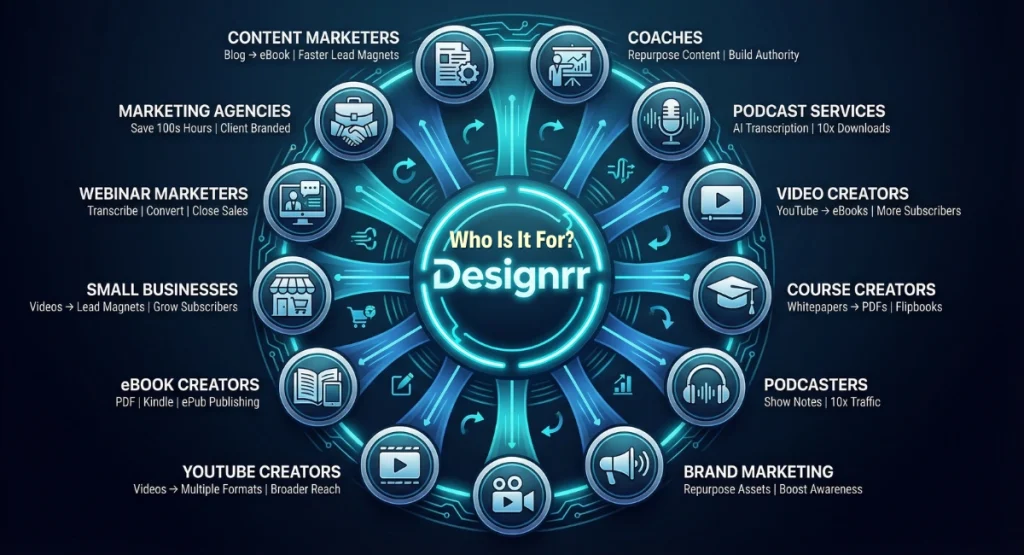
Here’s an infographic showing exactly who should use Designrr. These people will get the most benefit from using this content creation tool.
Designrr Review: The Benefits of This Tool
Here’s a list of the benefits of using Designrr in your business:
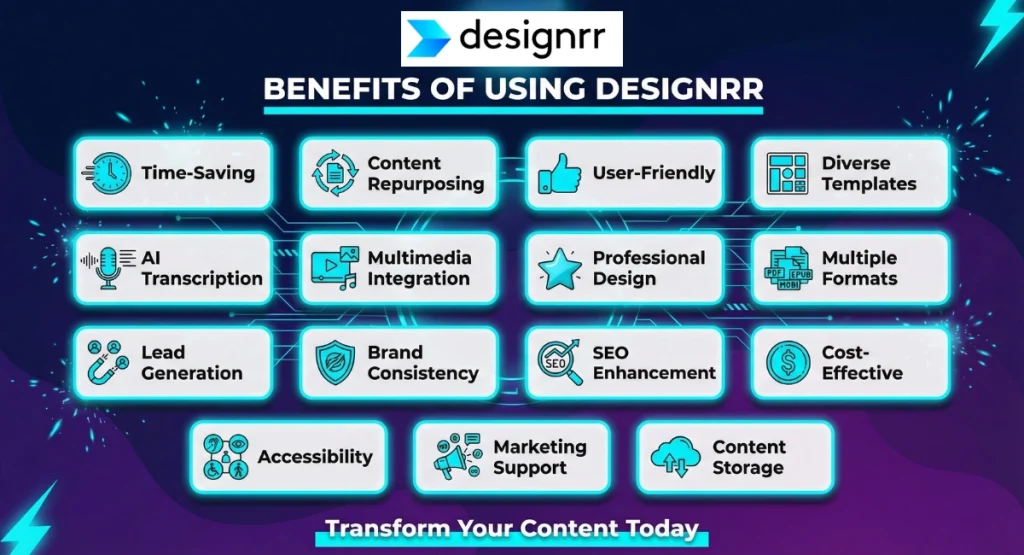
- Time-Saving: Quickly transforms existing content into powerful ebooks.
- Content Repurposing: Easily converts blogs, videos, and podcasts into various formats.
- User-Friendly: Simple interface, suitable for all skill levels.
- Diverse Templates: Wide range of design options for customization.
- AI Transcription: Efficiently transcribes audio and video content.
- Multimedia Integration: Enables inclusion of images, videos, and audio.
- Professional Design: Tools for creating high-quality ebooks and covers.
- Multiple Formats: Exports in PDF, Kindle, ePub, and flipbook formats.
- Lead Generation: Ideal for creating high-converting lead magnets from content in exchange for an email address
- Brand Consistency: Maintains uniformity across content.
- SEO Enhancement: Spreads content across platforms for better visibility.
- Cost-Effective: Offers a budget-friendly lifetime deal.
- Accessibility: Converts ebooks into audiobooks.
- Marketing Support: Useful for enhancing marketing and sales strategies.
- Content Storage: Allows easy access and reuse of created content.
Designrr Pros and Cons
Now, let’s take a look at the pros and cons of Designrr to give you more insight into this AI writing tool:
- Efficient Content Repurposing
- AI-Powered Transcription
- User-Friendly Interface
- Stunning Templates
- Multimedia Integration
- Multiple Output Formats
- Multiple Theme Options
- Image Editor
- Instant Access to Millions of Images -Royalty Free
- Free Marketing Ebook
- Free Commercial LIcense
- Cost-Effective
- Limited Advanced Features in Standard Plan
- Learning Curve
- Dependence on Source Quality
- WordGenie feature runs on a credit system
Review of Designrr and How To Use It
Now, here’s a detailed look at how to use Designrr. This is based on the way I personally use Designrr in my own business.
The Designrr Dashboard
When you first log in you’ll see that Designrr has a simple and clean-looking dashboard. I first thought it was a bit too simple, but it’s actually just well organised.
Once you’re logged in, you’ll find yourself navigating through a user-friendly dash. This is great because it ensures that even those new to digital marketing tools can find their way around with ease.
Designrr WordGenie
One of the biggest reasons Designrr has become more powerful over time is WordGenie.
This is Designrr’s built-in AI writing tool, and it can help you create an ebook draft from scratch much faster than writing the whole thing manually. That makes it handy when you want to get a first draft down quickly and then shape it into something more polished.
It is also worth knowing that WordGenie has become more advanced since I first wrote this review, so there are now a few extra things you should know before choosing a plan.
WordGenie Credits
WordGenie runs on a credit system.
These credits are used when the AI is generating content for you, such as outlines, chapter ideas, and the body copy of your ebook. A typical full ebook creation usually uses around 12,000 to 20,000 credits, depending on the topic, length, and language.
The good news is that credits are only tied to the AI writing side of Designrr.
So, if you are importing your own content into Designrr from a blog post, Word doc, PDF, Google Doc, YouTube video, or podcast transcript, then you are mainly using the editor, templates, and publishing tools rather than burning through credits every time. Designrr’s dashboard help article also notes that your credits info is visible from the left sidebar.
WordGenie Pro
There is now also WordGenie Pro, and this is one of the main differences between the Standard plan and the higher plans.
On Designrr’s current pricing page, the Standard plan includes Wordgenie AI Content creator, while the Pro and Premium plans include Wordgenie PRO AI Content creator. Premium also adds the AI Image generator, which is useful if you want Designrr to create visuals to go with your content rather than relying only on stock images.
In simple terms, WordGenie Pro gives you a more advanced version of the AI writing side of Designrr.
So, if you mainly want Designrr for basic ebook creation and content imports, the Standard plan may still be enough. But if you want the stronger AI writing features, and especially the AI image creation feature, then you’ll need to look at the higher plans.

Crafting Your eBook with WordGenie
Now, if you want Designrr’s AI writing tool to help write the content for you, then WordGenie is the feature that’ll do the biz-o for you here.
In my opinion, WordGenie is a standout feature that elevates Designrr to another level. It’s super-useful to speed up and even improve your eBook creation process.
What I especially like about Word Genie is its ability to generate extensive content for your entire eBook in one go. This contrasts sharply with ChatGPT, where you need to request content section by section due to its shorter word limit per prompt.
If you’d prefer to watch my step-by-step walkthrough video of Designrr’s Word Genie feature in action, then you can watch the video below.
That said, if you’re the ‘reading type’ and you’d prefer to read the instructions for the Designrr AI writing tool, then read on! I’ve also included screenshot images for you to have a visual while you read.
Anyway, that said, when you use Word Genie, you’re not just getting bits and pieces of content; you’re getting a comprehensive draft of your eBook. This is great because it saves a significant amount of time and effort, especially if you’re juggling multiple tasks in your business.
From my experience, Word Genie’s capability to produce a full-length eBook with multiple sections seamlessly is a game-changer.

Customizing Your eBook
When you’re done with your content, Designrr really shows its colors with customization. It’s got loads of templates, each with its own style. This is super handy for making your eBook feel like it’s truly yours, matching your brand and what your readers like.
Choosing the right template isn’t just about looking good. It’s about making your eBook something people want to read.
Designrr’s templates focus on keeping readers hooked. They make sure your eBook isn’t just smart, but also easy on the eyes. Tweaking the cover and layout lets you add your personal flair, helping your eBook pop.
What’s cool about Designrr is how it lets you jazz up your eBook. You can drop in pictures, videos, and even call-to-action buttons. These aren’t just for show – they make your eBook more interactive and interesting.
I found slipping these kinds of elements into my eBook pretty easy. It made the whole thing better without making it too busy. Getting this mix right is crucial for an eBook that’s both informative and a treat to look at.

Enhancing Your eBook with Advanced Features
Designrr really steps up the game with its advanced customization for eBooks. It lets you add audio and video, turning your eBook from just words on a page to a full-on multimedia adventure. This is awesome because it suits different ways people like to learn and keeps things interesting for your readers.
I’ve found adding these multimedia bits super helpful, especially when I’ve got something tricky to explain.
Videos and audio aren’t just cool extras; they’re like secret weapons for making tough ideas easier to get. When I added these to my eBook, it was a breeze, and it really upped the game for the whole thing.
Another neat thing about Designrr is making 2D and 3D covers. These aren’t just pretty pictures; they make your eBook look top-notch right from the start.
I saw that making these covers is pretty straightforward, even if you’re not a design pro. With these advanced tools, Designrr doesn’t just help you share information; it makes your eBook a hit, both in looks and content.

Finalizing and Publishing Your eBook
The last leg of your Designrr journey is pretty satisfying: getting your eBook all wrapped up and out there. This is when all your hard work pays off, turning what you’ve dreamed up and written into something real and digital. I really like how this part of Designrr is both easy and efficient.
When it’s time to put the final touches on your eBook, Designrr keeps it simple. You get to check over your work, tweak anything last minute, and make sure it’s all good to go. This is a big deal because it means your eBook looks sharp and professional when it finally gets out there.
And, if you need to make edits once you’ve published your book, then no worries, you can do that too.
I’ve found that getting your eBook out into the world with Designrr is a breeze, too. When you hit the ‘publish’ button you get a range of options including publishing your book as a PDF, an ePub, an audiobook, or even directly into the Amazon Kindle store!

Designrr Audiobooks
Diving deeper into Designrr, you find some cool extras that really add oomph to your eBook.
One big plus is turning your eBook into an audiobook. This is a game-changer because it lets more people enjoy your work, especially those who dig listening more than reading.
I’m really into the audiobook feature. It’s right on track with how popular audiobooks are these days. It’s handy for folks who are always on the move. When I gave it a whirl, flipping my text into something you can listen to was a piece of cake. It made my eBook way more flexible.
Designrr’s audiobook feature not only comes with a range of different AI voiceovers (which actually sound pretty decent), but you can even customize the voices by adjusting the pitch and tone. This is great because it helps to make your audiobooks eve more unique.
Unfortunately, the audiobook feature is not available on the Standard plan, so you’ll need to upgrade Designrr Premium to use it.

Designrr Print Books
Another newer feature worth knowing about is Print Books, which is available for Premium users.
This feature lets you take an existing draft inside Designrr and turn it into a professionally formatted print-ready book for Amazon KDP. That is a big step up from simply exporting a PDF or ebook, because you are now creating files specifically prepared for paperback publishing.
What is especially useful here is that Designrr handles a lot of the fiddly formatting work for you.
You can choose a trim size, use print-optimised layouts and typography, generate a matching cover, preview the final files, and then download the exact two files needed for KDP paperback submission: the cover file and the interior manuscript PDF. Designrr says these files are created to match Amazon KDP requirements, which makes the whole process much easier for non-designers.
This is great because formatting a print book properly can be a pain if you try to do it manually.
That said, there is currently one limitation. Designrr’s help article notes that it does not yet automatically force every chapter to start on a new page, so you may need to make that adjustment manually in some cases.
Still, for Premium users who want to turn their content into a physical book, this is a genuinely useful addition.
Designrr Ebook Tutorial
Now all that said, you’d probably like to see Designrr in action. So, with that in mind, if you want to see how to create an ebook with Designrr, then you can watch my Designrr tutorial video below.
Designrr Pricing and Offers
Designrr’s monthly plans start at $29, and each plan comes with a 7-day free trial.
Designrr also offers a lifetime deal on the Standard plan, and also some discount deals on the Pro and Premium plans (please see below).
Standard Plan: $29 per month
- Includes 1 user, 100 project templates, 922 Google fonts, unlimited ebook creation, and use of copyright-free images.
Pro Plan: $39 per month
- Offers 1 user, 300+ project templates, 200+ cover designs, 3D cover image tool, PDF export to Kindle/iBooks/ePub, and clone projects.
Premium Plan: $49 per month
- Provides 4 transcription hours per month, 1 user, 200+ project templates, 200+ cover designs, WordGenie Pro, AI image generation, custom template creation, export to any website using HTML embed code, and access to Print Books.
Business Plan: $99 per month
- Includes 8 transcription hours per month, 1 user, 200+ project templates, and all features of the Premium plan.

If you want a more detailed breakdown of how the credit system works, which plans include what, and how the pricing stacks up, I’d recommend reading my Designrr pricing guide here.
Designrr Pro vs Premium
If you are deciding between the Pro and Premium plans, the main thing to understand is that both plans are strong, but they are built for slightly different needs.
The Pro plan, which currently starts at $39 per month, is a better fit if your focus is on ebook creation, 3D covers, better import and export options, flipbooks, project cloning, and access to WordGenie Pro. It is a solid upgrade if you want more flexibility than the Standard plan without needing the extra media features.
The Premium plan, which currently starts at $49 per month, includes everything in Pro and adds some of the more advanced repurposing features, such as monthly transcription hours, the AI Image generator, custom templates, HTML embed export, audiobook creation, and now Print Books for Amazon KDP.
So, if your goal is mainly to create and publish ebooks more effectively, Pro may be enough.
But if you also want to turn videos or podcasts into content, create audiobooks, generate AI images, or prepare books for print, then Premium is where Designrr starts to become much more powerful.
Designrr Special Offers and Discounts
If you don’t like the idea of paying monthly for a software program, then I have good news for you.
Designrr also has a few deals, but these deals are not advertised on the Designrr website.
Here is the info on these Designrr discounts and deals, and how you can get access to them.
Designrr Lifetime Deal
Designrr has a hidden lifetime deal on the Standard plan for a one-time fee of $27. This is a no-brainer offer if you want to create professional-looking ebooks.
With the one-time fee or this lifetime deal you can create unlimited ebooks, access professional ebook covers and templates, access unlimited copyright free images, use page numbering, interactive table of contents generator, create flipbooks, and use Designrr’s powerful AI writing tool called Word Genie (powered by ChatGPT) to write your ebooks for you.
You can get access to the Designrr $27 lifetime deal here.

Designrr Premium Upgrade
The Designrr Premium plan gives you access to all of the features in the lower plans, but you also get WordGenie Pro, AI image generation, transcription hours, custom templates, audiobook creation, podcast and YouTube transcription, and the new Print Books feature for creating KDP-ready paperback files.
The Pro plan has a lot of powerful features. Unfortunately, there is no lifetime deal for the Pro plan. However, they do have a heavy discount option for the Premium plan, but it’s not advertised on their website.
You can get access to the Designrr Premium discount plan via this link here.

Designrr FAQs
Who is Designrr best suited for?
Designrr is best suited for bloggers, coaches, consultants, course creators, affiliate marketers, and content creators who want to turn existing content into ebooks, lead magnets, reports, flipbooks, or audiobooks. It is especially useful for people who want a faster way to repurpose content without needing advanced design skills.
Does Designrr use AI?
Yes, Designrr uses AI through its built-in WordGenie feature. WordGenie can help generate ebook outlines, draft content, and content ideas. Higher plans also include WordGenie Pro, and Premium adds AI image generation for ebook content.
Is Designrr good for creating lead magnets?
Yes, Designrr is very good for creating lead magnets. It is designed to help you quickly turn blog posts, documents, transcripts, and other existing content into professional-looking PDFs, ebooks, and downloadable guides that work well as opt-in offers.
Can I publish Designrr ebooks on Amazon KDP?
Yes, Designrr supports Amazon KDP publishing on higher plans. The Pro plan includes direct Amazon KDP publishing, and Premium also includes the Print Books feature, which helps create print-ready paperback files for KDP.
Is Designrr worth it?
Designrr is worth it for people who regularly create ebooks, lead magnets, or repurposed content and want to save time. It offers strong value for content creators, marketers, and online business owners, especially if you want an easier way to turn existing content into polished digital assets.
Review of Designrr: My Final Thoughts
And there you have it, my detailed Designrr review!
It’s clear that Designrr isn’t just another run-of-the-mill ebook builder; it’s a powerhouse for repurposing content into something extraordinary.
Whether you’re a blogger, podcaster, YouTuber, or digital marketer, Designrr offers a suite of features that can elevate your content game.
Sure, it’s got a few quirks, but don’t all great tools?
The bottom line: Designrr could be the secret weapon in your digital marketing arsenal.
And with the lifetime deal special offer, it’s practically a steal.
Dive into the world of effortless ebook creation and grab your Designrr lifetime deal.