

Paid partnership with Bluehost. #sponsoredbybluehost
Can Bluehost AI Builder really turn one sentence into a live website, for $0 to start, no credit card?
If you need a site this week and you don’t want to learn WordPress, that’s the question that matters. This Bluehost AI Builder review covers the new builder launched in November 2026, not the older one most reviews still describe.
I’ll walk through exactly what happened when I typed one prompt and published a real site, on the free plan, with no payment. I’ll show you the build step by step, what one credit actually buys, what happens when credits hit zero, and who should stay free versus upgrade.
If you need a simple site live today and you don’t want to touch a line of code, start on the free plan.
- Bluehost AI Builder turns one sentence into a live site, no design or coding needed
- Free plan lets you build and publish before you pay
- Your site stays online even when credits run out
- Free sites use a subdomain and aren’t indexed by search engines
- No ecommerce features; you’ll need Bluehost AI Store for that
- 5 daily credits on Free can feel tight for long editing sessions
Key Takeaways
- You can publish a real website for $0 to start, no credit card.
- One sentence gives you a first version with pages and copy; you refine it by chatting with the AI.
- Every message that creates or changes the site costs one credit, but your site stays online when credits run out.
- Free sites use a Bluehost subdomain and aren’t indexed by search engines.
- To use your own domain and have search engines index your site, upgrade to AI Builder Lite ($20/mo).
- This builder isn’t for selling products online; use Bluehost AI Store for that.
What Is Bluehost AI Builder?
Bluehost AI Builder is a tool that turns a plain-language description into a published website, then lets you refine the design, copy and images by chatting while you watch a live preview. It works in five steps: describe, refine, watch it build, publish, and manage.
It builds business websites, portfolios, landing pages, blogs, and simple web apps that run in a browser. Hosting is included on every plan, and there’s no WordPress knowledge needed.
This is the new Bluehost AI Builder that launched in November 2026, replacing Bluehost’s previous AI Website Builder for new customers. It’s currently labelled Early Access. It’s one of the newer entries alongside the other AI tools I recommend.
(I earn a commission)
Who Bluehost AI Builder Is Best For
If you run a service business, freelance, need a portfolio, a quick landing page, or want to test an idea before spending anything, this builder is for you. It’s also a good fit if you’re allergic to WordPress dashboards and just want something live by the end of the day.
Now, it’s not for you if you want to sell products directly on your site. For that, you’ll want Bluehost AI Store.
It’s also not the right tool if you need a native app in the Apple App Store or Google Play, or if you want full control over every line of code with a self-hosted WordPress install. But for a straightforward site that gets you online fast, Bluehost AI Builder is a good fit.
How to Build a Website With AI on Bluehost (My Test Build)
Here’s exactly how to build a website with AI on Bluehost, using the free plan.
Describe Your Site in One Sentence
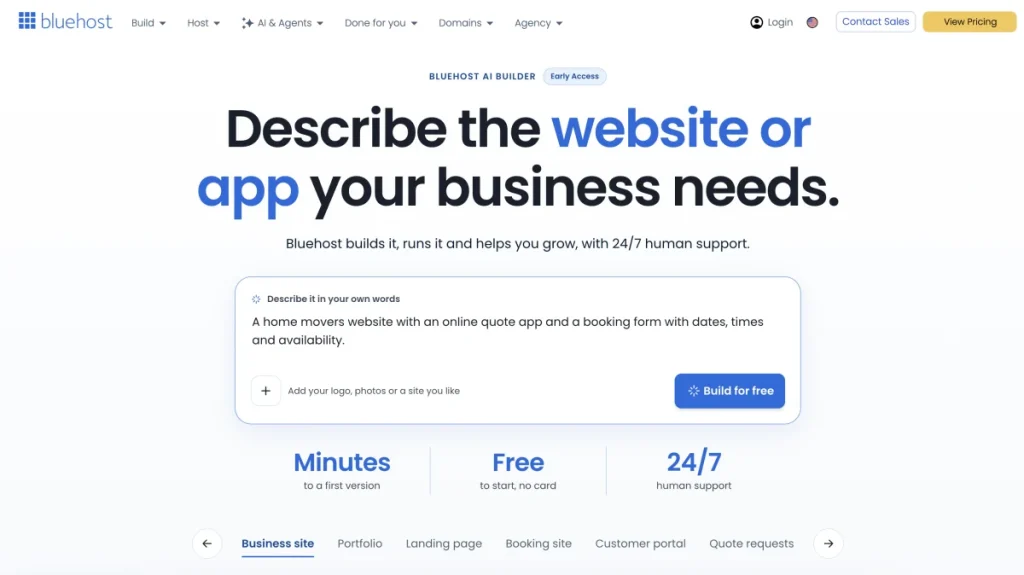
I typed: “A home movers website with an online quote app and a booking form with dates, times and availability.” You can also upload a logo or photos (PNG, JPG or WebP, up to 5 MB each), or point it at a site you like so it can match the look.
Answer the Clarifying Questions
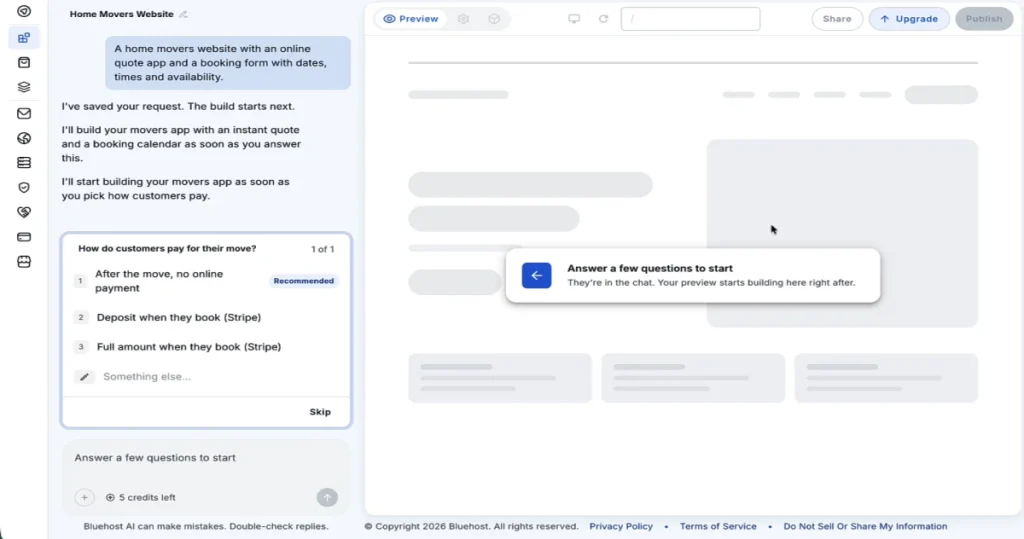
Before it started building, the AI asked one question: “How do customers pay for their move?” It offered a few options, with “after the move, no online payment” marked as recommended. I picked that.
While it built, it also offered four quick optional questions to tailor tips, starting with “Which best describes you?” The important part: these clarifying questions are free, and they don’t use any credits.
Watch the First Version Build
The AI showed a checklist while it worked: setting up the look, quotes and bookings, the dashboard, the pages. It said “Keeps going if you leave.”
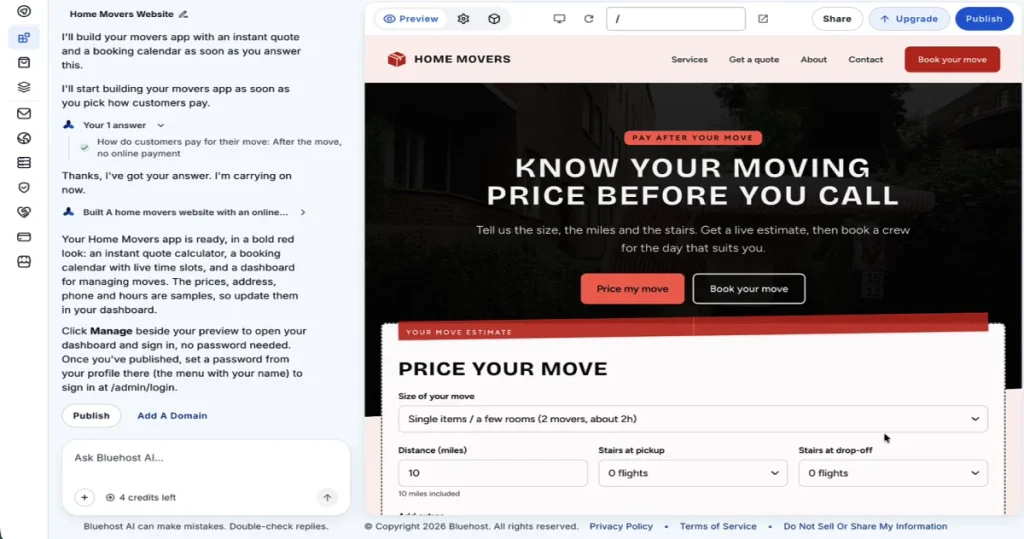
Bluehost AI Builder took my one sentence and turned it into a full site with a quote app and booking form. The first version that appeared was a red-accented Home Movers site with the headline “Know your moving price before you call.”
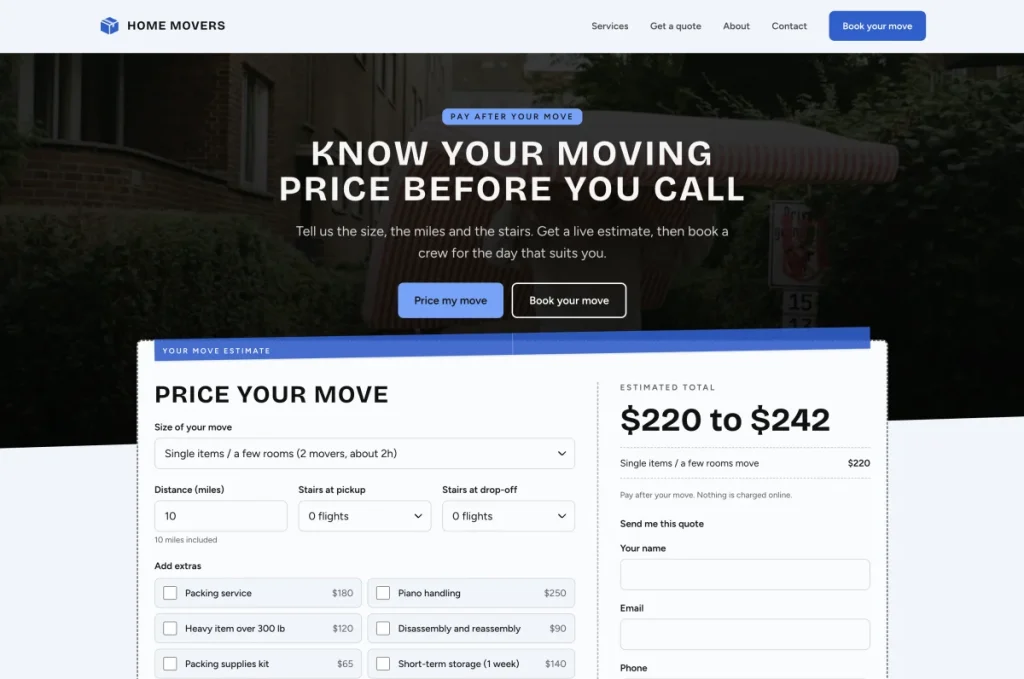
It had a working-looking price estimator (size of move, distance, stairs at pickup and drop-off, extras), a booking calendar with time slots, and a dashboard for managing moves. The pages included Services, Get a quote, About, and Contact. The AI told me its prices, address, phone number and hours were samples to update.
It actually got everything I asked for right first time.
Refine It by Chatting
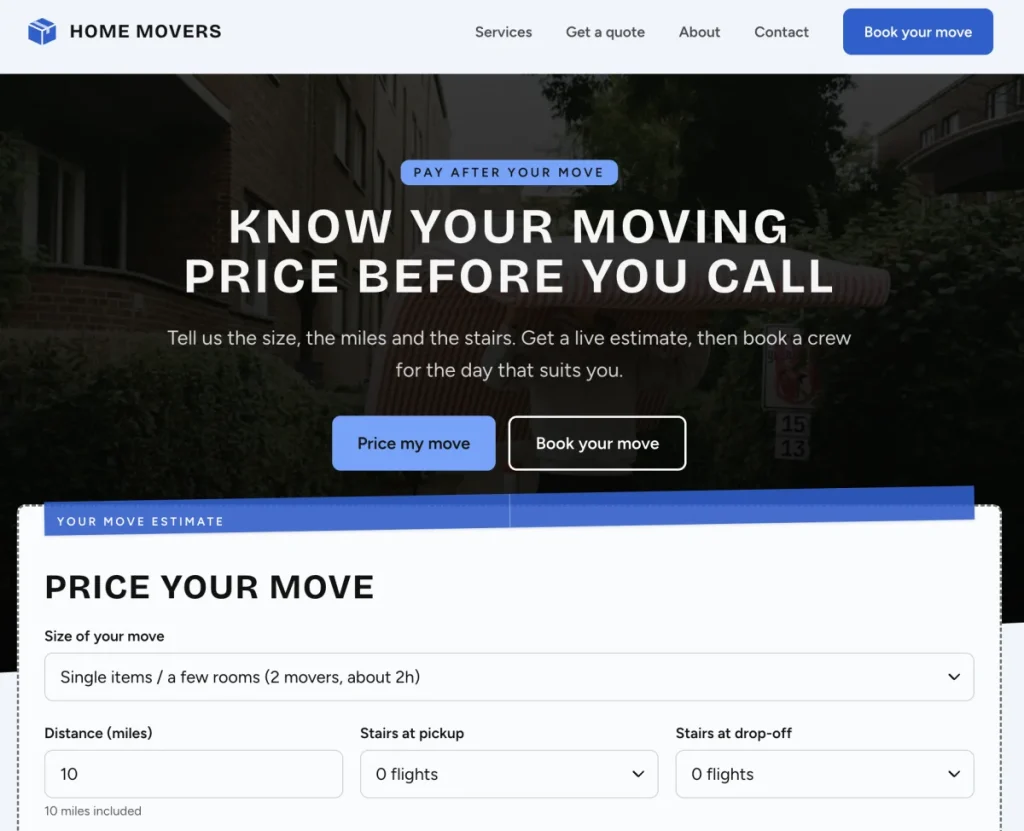
I typed “Change the red accent colour to blue.” The first attempt did not go through, so I sent the same message again and it worked.
It changed the accent to blue across the pages, the logo, and the dashboard, while the layout, quote app, and booking form stayed the same. That’s the kind of edit you’ll make most often.
Check Desktop, Tablet and Mobile Views
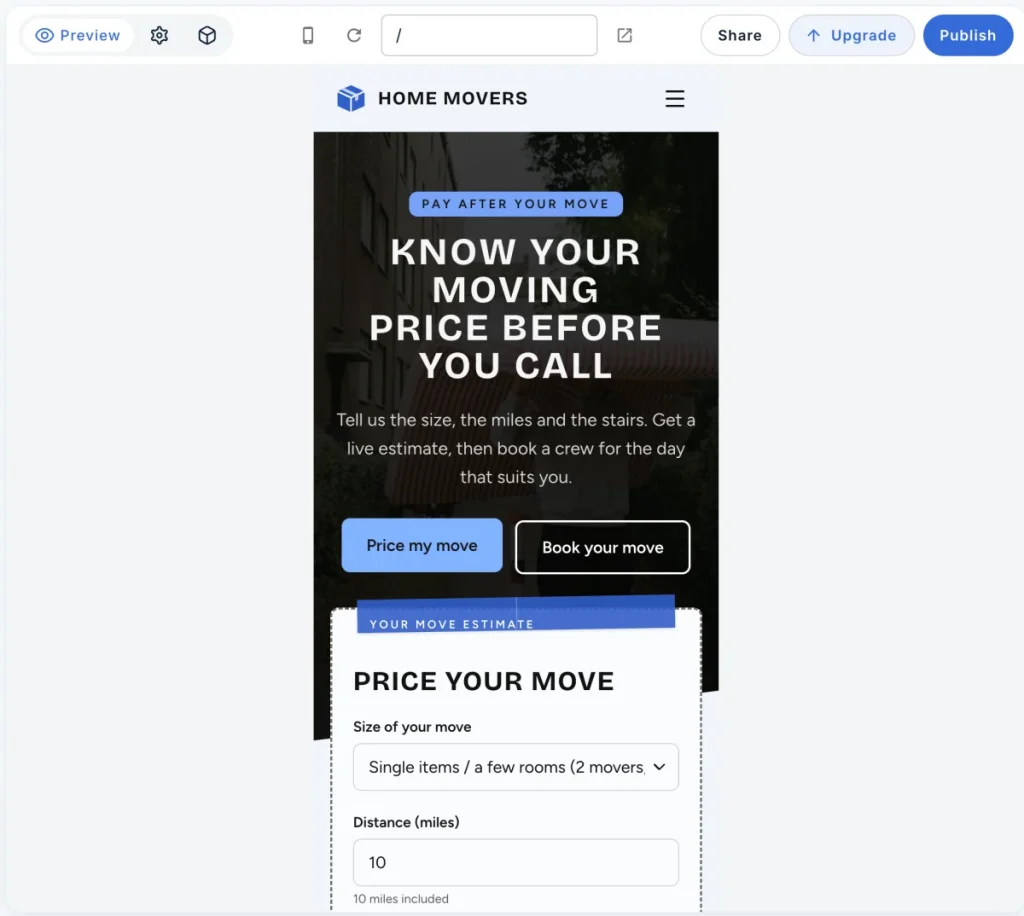
Before publishing, you can preview how the site looks on desktop, tablet, and mobile. I checked the desktop and mobile previews.
The mobile version stacked the headline and quote form into a single column with a menu icon. Tablet view is available too.
Publish Your Free AI Website
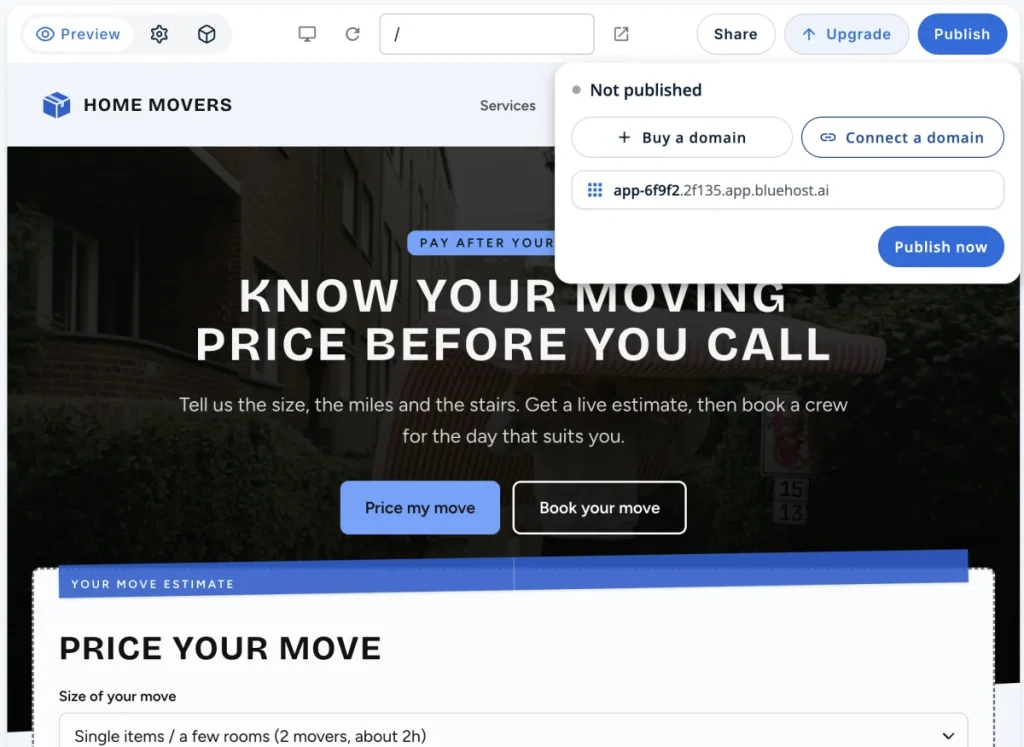
I clicked Publish, then Publish now. It gave me a free address on the app.bluehost.ai subdomain (a long auto-generated one).
The live page showed an estimate of $220 to $242 for the default move. The whole build used 2 credits: one for the first version, one for the colour edit. The first attempt at the colour edit did not use a credit.
(I earn a commission)
How AI Credits Work (and What Happens at Zero)
One message that creates or changes your site costs one credit. That’s it.
Clarifying questions are free, and hosting never uses credits. So the credit counter only moves when you’re actively building or editing. Bluehost AI Builder handles the heavy lifting, but credits are the fuel.
In my session, I started with 5 credits. The first build used one, the first attempt at the colour edit used none, and the successful edit used one. So I ended with 3 credits.
The important part: when credits run out, new changes pause until they refresh or you top up. Your published site stays online.
On the free plan, you get 5 credits a day, up to 30 a month, resetting daily at 00:00 UTC. They don’t roll over, and any you don’t use are gone.
On paid plans, monthly credits expire after 30 days. You can top up on any plan, including Free, with packs of 50, 100, or 200 credits starting at $15.
A practical tip: if you’re planning a longer editing session on the free plan, batch your changes into one clear message. That way you get more done per credit.
Bluehost AI Builder Pricing: Free, Lite, Standard and Pro
It’s $0 to start, no credit card, and there are paid plans from $20/mo. Here’s how the plans break down.
| Plan | Price | Credits per month | What you get |
|---|---|---|---|
| AI Builder Free | $0 | 5 a day, up to 30 a month | Free subdomain, no custom domain, site not indexed |
| AI Builder Lite | $20/mo | 100 | Connect your own domain; search engines can index it |
| AI Builder Standard | $40/mo | 200 | Everything in Lite, plus more credits |
| AI Builder Pro | $80/mo | 400 | Everything in Standard, plus the most credits |
Note: when I checked the sales page on 25 November 2026, only Free, Lite, and Standard were listed. Pro is in Bluehost’s plan documents.
A few costs that aren’t in the headline price: registering a new domain is separate from connecting one you already own. Top-ups start at $15 and are available on every plan, including Free. Billing is monthly or on a 12-month term, and you can only have one plan per account.
If I were starting today, I’d begin with Bluehost AI Builder’s free plan to see my idea live and make sure I liked the tool. Once I wanted my own domain and wanted search engines to be able to index the site, I’d move to AI Builder Lite.
(I earn a commission)
Bluehost AI Builder Pros and Cons
- Bluehost AI Builder turns one sentence into a live site, no design or coding needed
- Free plan lets you build and publish before you pay
- Edit by chatting, with changes previewed in real time
- Hosting is included on every plan, and support is available 24/7
- Your site stays online even when credits run out
- Free sites use a subdomain and aren’t indexed by search engines
- No ecommerce features; you’ll need Bluehost AI Store for that
- 5 daily credits on Free can feel tight for long editing sessions
- Can’t import an existing site; you start fresh or use a reference URL
- It’s fairly fast but the build can take a little longer than similar tools I’ve used
Where the Free Plan Falls Short
The free plan is generous, but it’s actually not a permanent home for a business site. The biggest limitation: sites on the free .app.bluehost.ai subdomain aren’t indexed by search engines. So your site won’t show up on Google, no matter how good it looks.
You also can’t use a custom domain on Free. That means no yourbusiness.com, which is a dealbreaker for most brands. And there’s no ecommerce at all; if you want to sell products, you’ll need Bluehost AI Store instead.
The 5-credit daily limit is fine for small tweaks, but a long editing session can feel a bit tight. The builder also can’t import an existing site, so you’re starting from scratch (though you can show it a reference URL for style ideas).
One more thing: the AI-generated copy is a solid starting point, but it needs a human edit before you publish. Google doesn’t automatically penalise AI-written content, but says to check it for accuracy and usefulness. Read Google’s AI content guidance for the full picture.
And if you’re someone who wants full control over every plugin and theme, this isn’t that. For that, you’d be better off with the hosting I use for WordPress sites.
I’d rate Bluehost AI Builder 4.6 out of 5. It’s good and fairly fast. The build can take a little longer than similar tools I’ve used, which is the only reason it’s not a 5.
FAQs
Is Bluehost AI Builder free?
Yes, there is actually a free plan, $0 to start, no credit card. You get 5 credits a day to build and edit, and you can publish on a Bluehost subdomain. The free plan has no end date, and hosting is included.
Can I use my own domain on the free plan?
No, custom domains are only available on the Lite plan and above. On the free plan, your site publishes to a yourname.app.bluehost.ai address. You’ll need to upgrade to connect a domain you own.
Will my free Bluehost site show up on Google?
No, sites on the free subdomain are not indexed by search engines. To have your site indexed, you need a paid plan with your own domain. Rankings aren’t guaranteed on any plan, and depend on your content and competition.
What happens when I run out of AI credits?
Your published site stays online and unchanged. You just can’t make new edits until your credits refresh or you buy a top-up. Credits reset daily on the free plan, which is capped at 30 credits a month.
Can I build an online store with Bluehost AI Builder?
No, Bluehost AI Builder doesn’t support ecommerce. For selling products online, you’ll want Bluehost AI Store.
Final Verdict: Should You Try Bluehost AI Builder?
If you need a simple site live today and you don’t want to touch a line of code, start on the free plan. You’ll see your idea become a real website, and you can decide if it fits before spending anything.
When you’re ready for your own domain and want search engines to index your site, upgrade to AI Builder Lite. That’s the plan where Bluehost AI Builder makes the most sense for a small business.
If you’re selling products, skip this and head to Bluehost AI Store. And if you want full WordPress control, this probably isn’t your tool. But for everyone else, the free plan is actually a way to get online right now.
(I earn a commission)

Steve West is the founder of entrepreneurnut.com, and has been working online since 2013. He specializes in SEO, YouTube, and affiliate marketing. Besides running his online business, he likes hiking, keeping fit, and eating cookies (which is why he needs to keep fit!)