

This blog is reader supported. If you click one of our links and make a purchase, we may receive a commission at no extra cost to you. In that event we thank you so much, for supporting our blog, it means the world to us. Have a great day!
Last Updated on 16th October 2026
Some days, email can feel less like a communication tool and more like a second full-time job.
You sit down to answer a few messages, and before you know it you’re knee-deep in newsletters, notifications, receipts, promotions, and emails that seemed important three days ago but now feel about as urgent as last week’s weather forecast.
That’s where AI email management tools come in.
The right tool can help you organize your inbox, prioritize important conversations, reduce distractions, and spend less time playing email traffic controller.
In this guide, you’ll discover the best AI tools for email management for entrepreneurs, including options for inbox organization, productivity, focus, and email cleanup.
Before we dive in, a quick bit of transparency: SaneBox sponsored its feature in this article. Everything I’ve written about it is based on my own research, and the opinions here are my own.
AI Email Management Tools: Key Takeaways
- SaneBox is the best overall choice for entrepreneurs who want a cleaner inbox and better email prioritization.
- Superhuman is ideal for people who spend a large part of their day managing email.
- Shortwave combines Gmail with powerful AI features and automation.
- Mailman helps reduce interruptions and protect valuable focus time.
- Clean Email is one of the best tools for decluttering an overloaded inbox.
| Image | Product | Features | Price |
|---|---|---|---|
Best Overall  |
| Check Price | |
Email Power Users  |
| Check Price | |
Good for Gmail Users  |
| Check Price | |
Focus Time  |
| Check Price | |
Inbox Cleanup  |
| Check Price |
1. SaneBox: Best AI Email Management Tool for Inbox Organization
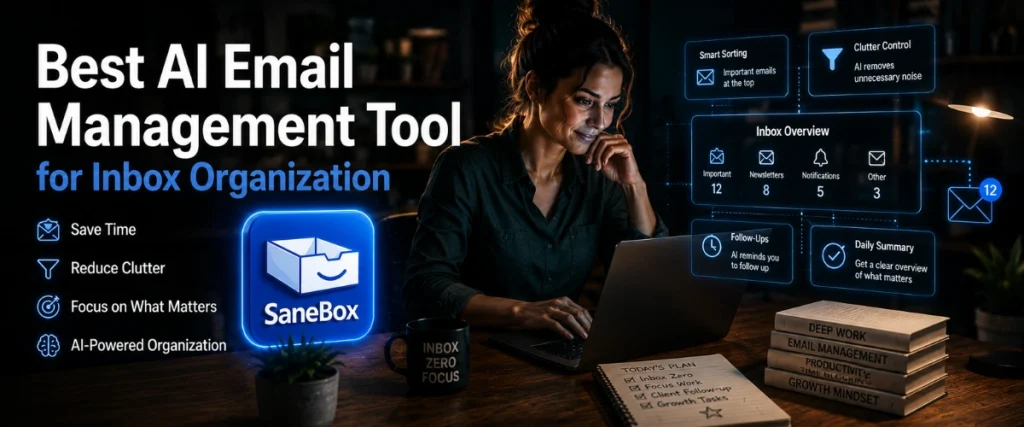
SaneBox Overview
If your inbox feels more like a storage cupboard than a communication tool, SaneBox is designed to bring some order to the chaos.
Unlike many email management software platforms, SaneBox doesn’t ask you to switch email providers or learn a completely new system. Instead, it works quietly in the background with Gmail, Outlook, Apple Mail, Yahoo Mail, and most other major email services.
That’s one of its biggest advantages.
You keep using the inbox you’re already familiar with while SaneBox handles much of the sorting and organization automatically.
The platform uses AI and automated email sorting to analyze incoming messages and determine which emails deserve your immediate attention and which can wait until later.
The result is a cleaner, less distracting inbox.
Its flagship feature is called SaneLater.
SaneLater automatically moves lower-priority messages into a separate folder while keeping important emails in your primary inbox. Instead of every email competing for your attention, the messages that genuinely matter are easier to spot.
For busy entrepreneurs, consultants, founders, and executives, that can make a surprisingly big difference.
After all, most people don’t have an email problem…
They have an attention problem.
The constant stream of incoming messages creates dozens of tiny interruptions throughout the day. Individually they seem harmless. Collectively they can destroy focus.
SaneBox helps reduce that noise.
According to the company, users save an average of around 2.5 hours per week through better email organization and inbox management.
Another benefit is the simplicity of getting started.
There are no complicated rules to build, no software to install, and no lengthy setup process. Most users can connect their account and start using the platform within a few minutes.
Key Benefits
The biggest strength of SaneBox isn’t that it helps you write emails faster.
It’s that it helps you spend less time dealing with email in the first place.
Some of the most useful benefits include:
- AI-powered email filtering and prioritization
- Automatic sorting of low-priority messages
- Works with Gmail, Outlook, Apple Mail, Yahoo Mail, and more
- Quick setup with no software installation required
- Reduces inbox clutter and distractions
- Helps create a more efficient email workflow
Beyond SaneLater, the platform includes several additional tools designed to improve inbox management.
SaneBlackHole allows you to permanently block unwanted senders with a single action.
SaneReminders can notify you if someone hasn’t replied to an important email.
Snooze folders let you temporarily remove messages from your inbox and have them reappear exactly when you want to deal with them.
Together, these features help transform email from a constant source of interruption into something that’s much easier to control.
SaneBox Pros and Cons
- Works with existing Gmail and Outlook accounts
- Strong AI-powered inbox management
- Easy setup process
- Helpful follow-up reminders
- Doesn't require changing email providers
- Takes a little time to learn your preferences
- Focuses on email organization rather than AI writing
- Advanced features require higher-tier plans
Who Is SaneBox Best For?
SaneBox is an excellent fit for entrepreneurs, founders, consultants, executives, and anyone receiving a high volume of email.
If your goal is inbox zero, better email organization, and fewer distractions throughout the day, it’s one of the strongest options available.
It’s particularly appealing for users looking for email management software for Gmail or email management software for Outlook without switching to an entirely new email client.
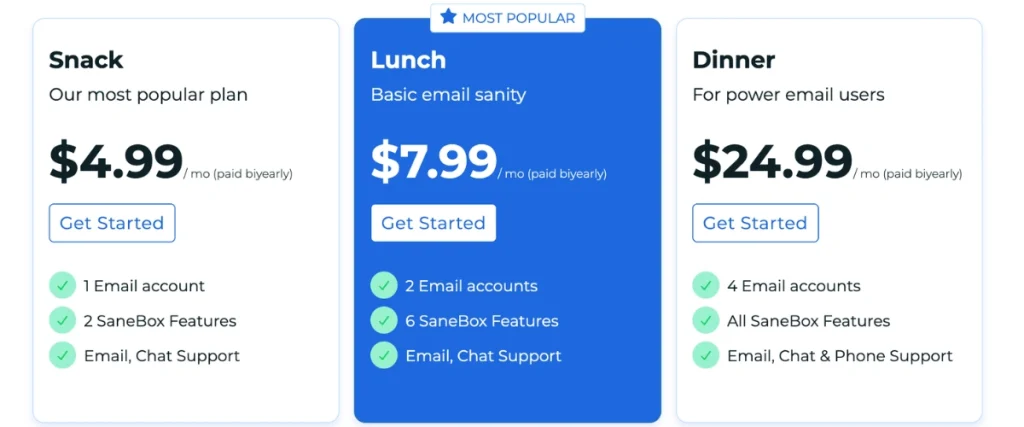
SaneBox Pricing
SaneBox offers a free 14-day trial.
Paid plans start at $7 per month, with larger plans available for users who need additional features or support for multiple email accounts. That said, you can get $15 off SaneBox via this link here.
Verdict
Many AI tools focus on helping you create more email.
SaneBox focuses on helping you see less of the email that doesn’t matter.
For most entrepreneurs, that’s often the bigger problem.
If you want a smarter inbox, fewer distractions, and a simple way to improve email productivity, SaneBox is one of the best AI tools for email management currently available.
That’s why it earns the top spot on this list.
2. Superhuman: Best for Email Power Users

Superhuman Mail Overview
Some people check email a few times a day.
Others practically run their business from their inbox.
If you’re in the second group, Superhuman was built with you in mind.
Unlike traditional email inbox management tools, Superhuman is a premium email client designed around speed. Everything from the interface to the keyboard shortcuts is built to help users move through email faster and with less friction.
Think of it as the Formula One car of email.
Fast, powerful, and designed for people who spend a lot of time behind the wheel.
The platform works with Gmail and Outlook and includes AI-powered features that can help draft emails, summarize conversations, and streamline communication.
Rather than simply organizing messages, Superhuman aims to improve the entire email experience.
For founders, sales professionals, recruiters, and executives who spend hours each day managing conversations, those small efficiency gains can quickly add up.
One thing worth noting, however, is that Superhuman replaces your existing email interface.
That can be a positive or a negative depending on your preferences.
Some users love the streamlined experience.
Others may prefer a solution that works alongside their current inbox rather than replacing it.
Key Benefits
Superhuman is designed to remove as much friction from email as possible.
Some of its standout features include:
- AI-assisted email drafting
- AI conversation summaries
- Split inbox functionality
- Follow-up reminders
- Read receipts
- Fast keyboard shortcuts
- Gmail and Outlook support
One of the platform’s biggest strengths is how quickly users can move through large volumes of email.
Rather than constantly clicking menus and navigating folders, many common actions can be performed using keyboard shortcuts. Once learned, the workflow feels remarkably efficient.
The AI features also help reduce some of the repetitive work involved in managing communication.
Need to catch up on a long email thread?
Conversation summaries can help.
Need to draft a response?
The AI can provide a starting point.
It’s not about replacing human communication. It’s about reducing the administrative work around it.
Superhuman Mail Pros and Cons
- Extremely fast email workflow
- Strong AI writing assistance
- Excellent keyboard shortcuts
- Helpful conversation summaries
- Works with Gmail and Outlook
- Premium pricing
- Learning curve for new users
- Requires switching to a new email interface
Who Is Superhuman Mail Best For?
Superhuman is best suited for founders, executives, sales professionals, recruiters, and anyone who spends a significant portion of their working day managing email.
If your inbox is one of your primary work tools, the productivity gains can be substantial.
If you only check email a few times a day, it may be more tool than you actually need.
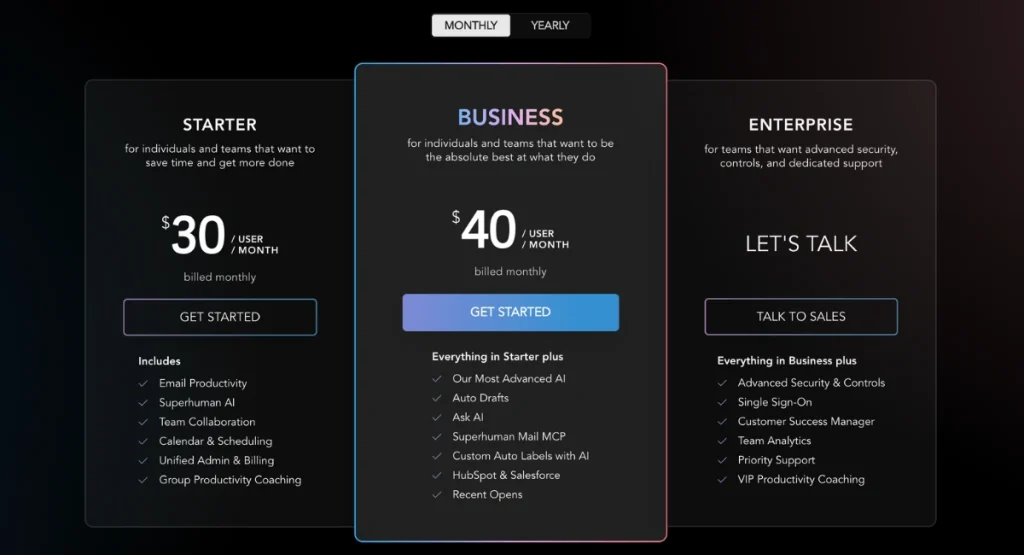
Superhuman Mail Pricing
Superhuman offers a free trial and several premium plans.
Because pricing and features change periodically, it’s worth checking the latest plans directly before making a purchasing decision.
Verdict
Superhuman isn’t trying to create a calmer inbox.
It’s trying to create a faster one.
For heavy email users, that distinction matters.
If you’re looking for a high-performance email client that helps you move through messages more efficiently, Superhuman is one of the strongest options on the market.
3. Shortwave: Best for Gmail Users

Shortwave Overview
If Gmail feels a little dated but you don’t want to abandon it completely, Shortwave offers an interesting middle ground.
Built specifically for Gmail users, Shortwave combines a familiar email foundation with modern AI features designed to help you organize, read, search, and respond to messages more efficiently.
The platform focuses heavily on reducing information overload.
One way it does this is through AI-powered email summaries.
Instead of reading every message in a lengthy thread, Shortwave can generate concise summaries that highlight the most important points.
That might not sound revolutionary until you’re staring at a conversation containing twenty replies and trying to work out what actually happened.
Shortwave also introduces email bundling.
Related emails are grouped together automatically, helping reduce inbox clutter and making your inbox feel more manageable.
Rather than scrolling through a long list of disconnected messages, conversations are organized into cleaner, more structured groups.
The overall experience feels modern and intentionally designed around today’s communication habits.
If you’re building a broader AI productivity stack, you may also want to explore some of the best ChatGPT plugins for productivity.
Key Benefits
Some of Shortwave’s most useful features include